Specifying Agents of Subsequent Steps Dynamically
Specifying Agents of Subsequent Steps Dynamically
Use
The
actual agent of the step Determine agents in a workflow can specify the recipients who are to receive the work item of the subsequent step Any activity in the same workflow. The step Any activity does not have to follow the step Determine agents directly.You can only specify users as recipients if they are
possible agents of the relevant task.
Use
Features
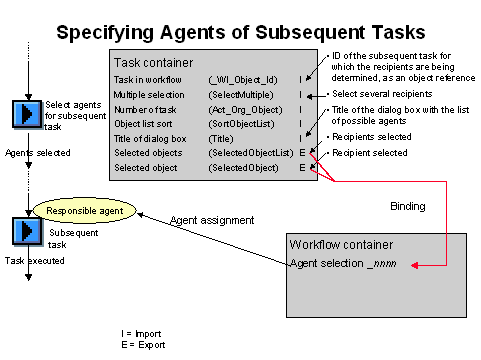
You can use the wizard Include "Choose agent" to extend the workflow definition. In this wizard you specify the task for which you want to select recipients. The wizard extends the workflow definition by adding two steps:
Activity Selection of agents for subsequent task
The system enters the workflow initiator as
responsible agent for this task.The actual agent of this work item selects the recipients from the possible agents of the subsequent task. A list of the possible agents of the subsequent task is displayed if it is not a
general task. If the subsequent task is a general task, the actual agent can select the recipients from all users of the system.The recipients are transported with a binding into a multiline workflow container element created by the system.
Activity that references the subsequent task you specify
The
responsible agents of the subsequent task are read by the system from container element created.The graphic below illustrates the extension of the workflow definition and the bindings created.
Activities
Execute the wizard Include "Choose agent". You have to edit the steps created if:
You need your own task for the activity Selection of agents for subsequent task if, for example, you want to enter your own texts for the task.
For further information, refer to
Copying a Selection Task .