 Creation of a Wf-XML Document
Creation of a Wf-XML Document
Use
The data exchange with other systems in performed with an XML document in a WebFlow. The workflow system can generate an XML document automatically for the data to be transferred, which is in accordance with the Wf-XML transfer format of the Workflow Management Coalition in the beta version of 11
January 2000 with the following modification:The operation
CreateProcessInstance is used to start a Business Workflow.Features
The following Wf-XML documents are created automatically:
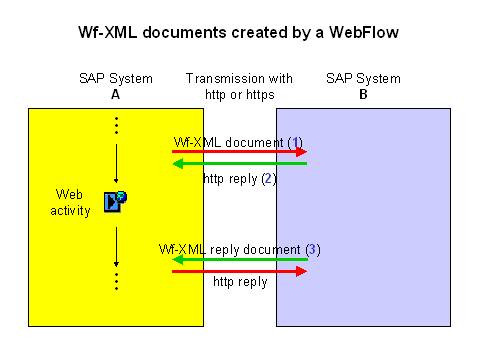
Wf-XML document (1)
The import parameters from the task container are used in creation. These are derived from the
interface of the reference workflow of the Web activity.The import parameter data of the task container is written into the Wf-XML document. The following content is transferred depending on the
data type reference:Data type reference |
Content transferred |
ABAP Dictionary |
All data |
Object reference to XML_DOC |
Referenced XML document itself is transferred in full |
Other object reference |
Not supported |

Multiline import parameters are not supported.
Within the Wf-XML document the data from a container element is stored in separate areas denoted using < container_element_ID> data </ container_element_ID> . The assignment of the data to the individual areas is made on the basis of name parity. When an SAP System receives a Wf-XML document that is to start or continue a workflow, the data from the individual sections of the Wf-XML document is assigned to container elements in the workflow container on the basis of name parity as well. For an example of a generated Wf-XML document (1), refer to number 1 in Examples of Created Wf-XML Documents.
If the indicator Wait for feedback is set within the Web activity, the URL to which the Wf-XML reply document (3) from system B is to be sent is written into the Wf-XML document (1) under <ObserverKey> . This ensures that the Wf-XML reply document (3) can be evaluated by the Web activity. The Web server must be defined for the URL to be created.
http reply (2)
If SAP System B receives a Wf-XML document, it sends an http reply (2) in the form of an XML document. This confirms the start of the Business Workflow. For an example of an http reply (2), refer to number 2
Examples of Created Wf-XML Documents.Wf-XML reply document (3)
If system A is waiting for feedback, SAP System B sends a Wf-XML reply document (3) after the Business Workflow is completed. The export parameters of the workflow are written in the relevant areas of the Wf-XML reply document (3) as with the import parameters when the call is made. For an example of a generated Wf-XML reply document (3), refer to number 3
Examples of Created Wf-XML Documents.Activities
The system creates the Wf-XML document automatically is you chose transfer format
01 in the Web activity. You will find the XML documents created in the work item display of the Web work item.If a Wf-XML document was to start a Business Workflow in your system but this has failed, you can find and display the Wf-XML document using the report
Displaying XML Documents.