Date Determination in Dispatching and Rescheduling
Date Determination in Dispatching and Rescheduling
The system can automatically dispatch operations, for example, from production orders, plant maintenance orders or networks on both types of planning table. Either you or the system can specify the date when dispatching is to take place.
Manual dispatching
If you only want manual rather than automatic dispatching to take place on one of the planning tables, set the indicator Date entry when dispatching. In this case, once you have selected the planning table function Dispatch a dialog box appears in which you must enter a target time that depends on the planning direction and a target work center. This entry is then valid for all the operations that you have selected.

You can manually dispatch an operation on the planning table (tabular form) with the function key
Dispatching
There are five ways to determine the dispatch date. The first distinguishes between internally processed operations, for example within Plant Maintenance (PM) and the Project System (PS) and operations that are divided into operation segments (for example, in the production order). The last four are valid for all operations.
Operations that are divided into segments (for example, in the production order): The dispatching date is the latest start date for the operation.
Internally-processed operations: How internally-processed operations are dispatched depends on the settings in the strategy profile in Customizing for capacity leveling. You can find more information on the strategy profile in
When dispatching an internally processed operation, the system checks the time constraints you have set for the start and finish of an operation.
In a dialog box you must enter the date and time when the operation is to start or finish depending on the planning direction, as well as the work center.
In the dialog box Dispatch manually you can enter the date and the time when the operation is to start or finish as well as the work center.
The dispatching date is the first day of the period.
Rescheduling
When rescheduling an internally processed operation or activity, for example in the project system, the system checks the time constraints you have set for the start and the finish of an operation or activity.
If you want to dispatch an operation to a different work center from the one to which it has already been dispatched, then the new work center must belong to the selection set of the work centers that were selected when you initially accessed the planning table.
Deallocating
If you want to deallocate an operation that has already been dispatched, select this operation and choose the pushbutton
Deallocate .The current dispatching data is cancelled. The status "dispatched" of the operation is reversed. The order is rescheduled.
If further operations exist for an order which has already been dispatched, the system automatically carries out midpoint scheduling. If no other dispatched operations exist, the system carries out lead time scheduling
In the project system there is no new scheduling of the operations once a requirement has been deallocated.
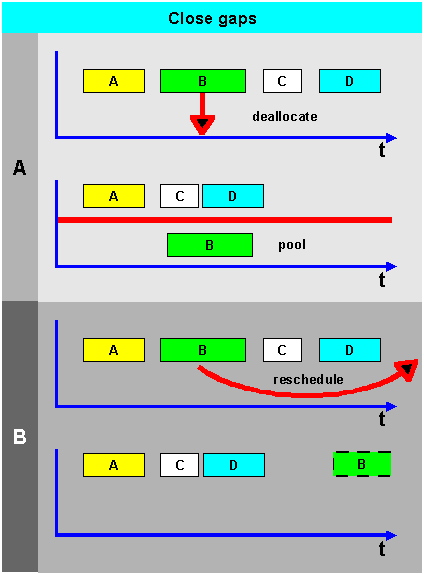
The system can close any gaps caused by deallocation and rescheduling in the planning table by shifting operations next to the gap in the planning direction (see next graphic). The sequence of operations remains the same. You should maintain the key Close gaps in the strategy profile.
If an error occurs when closing the gaps then it is not carried out, that is, all operations remain where they are.