 Creating and Processing Tax Invoices (Business Places)
Creating and Processing Tax Invoices (Business Places)
In Korea, it is common business practice that deliveries between two business places of the same company code result in the issue of a tax invoice (see also
Creating and Processing Tax Invoices (Customers)). In this case, VAT input tax and output tax have to be posted. In the SAP R/3 system, it is not possible to post VAT real-time while goods are moved within one company code.It is therefore recommended that a company, which plans to use SAP and consists of more than one business place, applies for an Aggregation of Payment permission. With the permission of Aggregation of Payment, goods movements within one company are exempt from VAT postings.
If it is inconvenient for your company to apply for this Aggregation of Payment permission, you have to post the VAT manually using direct posting in FI. To post the input and output tax manually some prerequisites have to met before. In the R/3 System it is not allowed to enter more than one business place. A document consisting of more than a business place would be denied by the system. Therefore a clearing account for VAT between business places has to be defined. In the Korean template of the system you can find the account 9100 0000 (Chart of Account CAKR and company code KR01) which was created for this purpose. You can use just one account for all transactions between all business places or several accounts, e.g. for each combination of the business places in your company one account. The choice should be made upon the no of the transactions between business places.
The process is defined as followed:
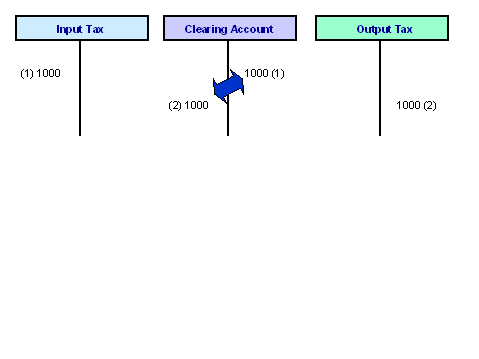
Post output tax and clearing account (for the issuing business place). Enter the code of the partner business place in the reference1-field on the clearing account line item. To do that the field status must be customized so that this field is open for entry.
Post clearing account and input tax (for the receiving business place). Enter the code of the partner business place in the reference1-field on the clearing account line item (like step A)).
The two open items will be cleared against each other by a report. This clearing document is the tax invoice. Execute the report RFIDKRTCIB to create and print the tax invoice.
After step A) and B) the clearing account should have two open items. One on debit and one on the credit side. It is important that the clearing account is open items managed because the clearing of the two open items against each other is the tax invoice for the system. In more details the report RFIDKRTCIB creates a clearing document by clearing the two open items against each other. The created clearing document is the tax invoice for the system. This clearing document should be of the same document type the tax invoice for customers. Then you have just one document type for tax invoices in general.
Example of the process flow:
DR: Clearing Account (9100 0000 in CAKR)
Reference 1: Code of the receiving business place
CR: Output tax xxx
Base amount: amount of the original transaction
Business Place: Business Place of the issuing business place
Tax code: tax code for 10% output VAT
Base amount: tax base amount
DR: Input tax xxx
Base amount: amount of the original transaction
Business Place: Business Place of the receiving business place
Tax code: tax code for 10% input VAT
Base amount: tax base amount
CR: Clearing Account (9100 0000 in CAKR)
Reference 1: Code of the issuing business place
Tax Invoice Printout
The report RFIDKRTPIB prints the tax invoice between business places. Usually this report is called automatically after creation of the tax invoice when executing RFIDKRTCIB. But if copies of the tax invoices are destroyed or the customer needs another copy the report RFIDKRTPIB can handle the single print-out. Fill in the selection criteria upon your needs in the selection screen.
The SAPscript layout set is FTIV_KR_IBP. For adjustment of the print-out it might be necessary that the form is set according to your preprinted forms.