
Possible Entries (Function)
Possible entries
displays the valid input values for a field.When the user chooses the function Possible entries, the system displays the possible input values for a field (values, check table, matchcode), provided they were stored by the developer. The help system decides as to which possible entries are displayed. Possible entries is a standard function.
Access
Function Key |
Pull-Down Menu |
Pushbutton |
Access Character |
Icon |
F4 * |
The function is not assigned to a pull-down menu. ** |
--- |
--- |
--- |
*)
F4 must not be assigned to any other function.**) Further functionalities of the help system are given in the Help menu.

You can get help for possible entries for input/output fields with the Possible entries pushbutton. This pushbutton is permanently or not permanently displayed to the right of these fields, if the function is supported (see
Technical Notes
If the user calls the function Possible entries on a screen field ready for input, the following algorithm runs internally:
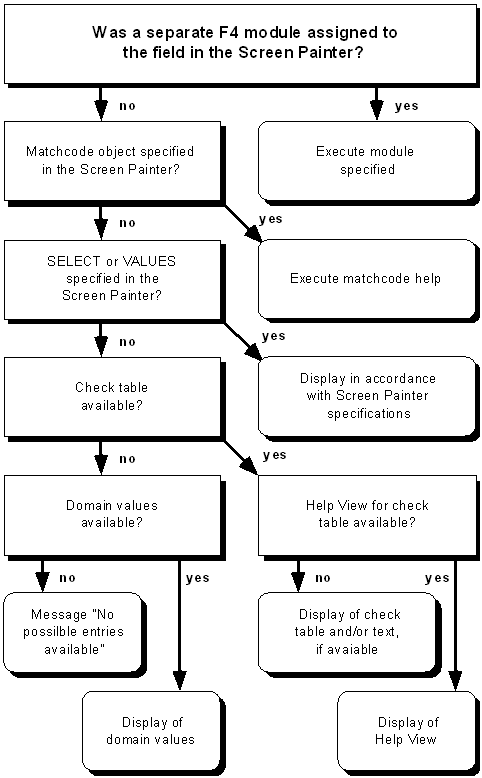
Thus, the procedure after calling Possible entries basically depends on which specifications were made by the task developer in the Screen Painter or in the ABAP/4 Dictionary. Below, special relevant help concepts are described in more detail.
Help Views
In most cases, a help view is displayed after calling Possible entries which is determined with the check table specified for a field in the ABAP/4 Dictionary (The check table does not have to be used for the input validation, that is, the corresponding indicator does not have to be set in the Screen Painter.). A help view is created with the ABAP/4 Dictionary transaction SE11. The name has to be set up as follows: H_<Name of the check table>. The check table has to be specified as primary table of the help view.
Due to performance reasons, it is absolutely necessary to define a help view for each of the check tables called with
F4 . The key fields of the check table as well as possibly existing texts from a corresponding text table are also displayed when pressing F4 even if no help view exists, but the response time here is much longer (because a report has to be generated for the process).Separate F4 Module
In some cases, you cannot directly control the possible entry functionality with ABAP/4 Dictionary definitions, but you have to create your own module in the task program which is executed when you call "Possible entries". In this module, data can be listed and displayed individually. The display, however, should refer to the standard display of possible entries to avoid displaying different screens to the user. To do this, you should possibly use the general function module HELP_VALUES_GET_WITH_TABLE. The function group SHL3 contains even further function modules which can be useful when you program your own possible entries function.
To make sure that a module is executed when you call "Possible entries", you have to specify the following in the flow logic of the Screen Painter:
PROCESS ON VALUE-REQUEST.
FIELD field name MODULE module name.
The event PROCESS ON VALUE-REQUEST is always processed if the user has called "Possible entries". If the cursor is positioned on a field which is named in a following FIELD statement, the module specified there is executed.
Cross-References