
Technical Notes
ABAP/4
You can define the symbols of the symbol character set by using the ABAP/4 WRITE statements:
WRITE sym AS SYMBOL.
The symbolic names of the symbols are defined in the <SYMBOL> include which must be added to the report using the symbols. Transaction LIBS contains the symbolic names of the symbols in the list " List of Symbols with Proposals".

For more information on symbols in lists, please see "help write" in the ABAP/4 editor.
Special Cases
The SAPDings character set is "pseudo-equidistant". Nominally, the characters have the same width: the next character begins after the nominal width of a character. For more complex objects there is usually not enough room. For that reason, some of the characters are actually wider (double width at the maximum). These characters must be followed by a blank character to avoid overwriting the next character. The ABAP/4 WRITE statement automatically inserts a blank character. For more information on the width of the symbols please refer to the "width" column in above mentioned table.
The SAPDings character set is a 7-bit PC character set; it defines only characters in the coding area between 0 and 127.
When outputing reports with the SAPWIN/SAPLPD device, symbols can be printed in lists. With non-postscript and/or non-truetype printers and/or when printing with other devices, replacement characters are printed (see Transaction LIBS).
To print icons in lists, the SAPIcons character set is used. This character set creates replacement symbols for these icons. Above mentioned restrictions apply (that is, on some printers only replacement characters are printed). Icons for which SAPIcons has not defined replacement characters cannot be printed at all!
SAPDINGS Symbol Character Set
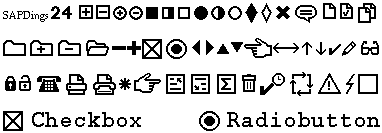
The SAPDings Symbol Character Set