
Lists - Hotspots
Use and Appearance
Hotspots are areas on lists the user can click on to trigger an action.
Use
Hotspots should not be used to replace pushbuttons with no fixed position. Hotspots can not be implemenetd as pushbuttons because their appearance does not meet the corresponding criteria. Hotspots implemented as pushbuttons would rather confuse than support the user.
Remember: Hotspots are not pushbuttons!

For more restrictions on the use of hotspots, please refer to the Technical Notes!
Appearance
Hotspots are flat on the template. When the user positions the cursor on a hotspot, the cursor takes on the shape of a hand. Since this is the only way for the user to recognize a hotspot on the screen, it is recommended to indicate hotspot areas additionally with a specific color.
Area of Use
Hypertext
Hotspots are primarily used in hypertext links. Hotspots are to be highlighted in the text (see Technical Notes).
Hierarchies
Hotspots can be used in hierarchical lists to expand or collapse information. One example is the hierarchical graphic, another inserted information. (See
Lists - Colors and Lines).If objects that can be expanded and collapsed should remain in an selected state for other actions, an appropriate symbol has to preceed the object, for example, a folder symbol (see
Lists - Symbols and Icons), or the Expand/Collapse icons are to be used (see Pushbuttons with Icons on Data Screens).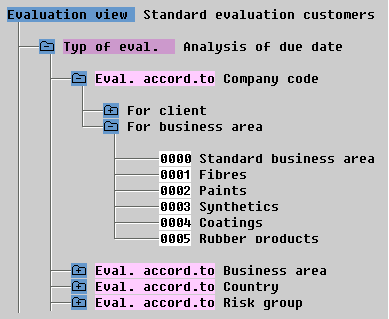
Hotspots are typically used in hierarchies (folder symbols)
Detail
In general, hotspots can be used similiar to the present
F2 functionality. Please note the technical restrictions (see Technical Notes).Technical Notes
Behaviour
Hotspots are presently implemented to respond to the Mouse-Down event in the SAPGUI. The action is triggered immediately. The user cannot undo his/her action by moving the mouse and releasing the mouse button. For this reason, hotspots should not trigger actions that take a long time to execute, for example, extensive data analysis or direct manipulation of the database.
Remember: Hotspots should only be used for short-running actions which the user can undo easily and which do not change the database!
Indicating Hypertext Links
Hypertext links currently have a background color applied to them. In future, you should use a foreground color (green or blue) and underline the link.
More Information
For information on programming hotspots, please refer to the online documentation in the ABAP/4 Editor under help hotspot.
Cross-References