
Multiple-Line Lists
For multiple-line lists, the rules for one-line lists apply except for the exceptions or modifications described below.
Example
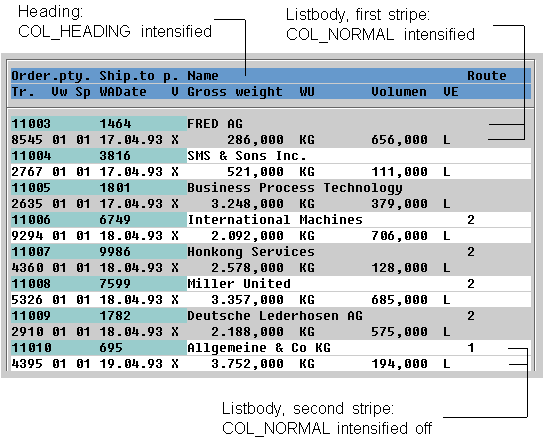
Column Headers
Lines
The header lines are separated as a whole by a horizontal line below the last physical header line of the list body.
If it is possible to align the table columns, you can define vertical lines between the column headers.
Column Display
Column Spacing, Lines
The columns of multiple-line lists are usually separated from each other by at least two blanks.
If it is possible to align the columns, you can also define vertical lines between the columns.
Line Display
Color
Stripe pattern from COL_NORMAL INTENSIFIED alternating with COL_NORMAL INTENSIFIED OFF (starting with COL_NORMAL INTENSIFIED) from logical lines.
Grouping of Lines
Blank Lines, Lines
Individual logical lines are neither separated by blank lines nor by horizontal lines.
You can, however, separate groups of logical lines, as in one-line lists.
Highlighting Columns
In multiple-line lists, no columns are highlighted except for key columns (see exception rule for key columns).
Exception: Columns can be highlighted, if the columns are aligned with each other and if continuous highlighting makes sense with the contents.