
One-Line Lists
Examples
The following figures show typical one-line lists.
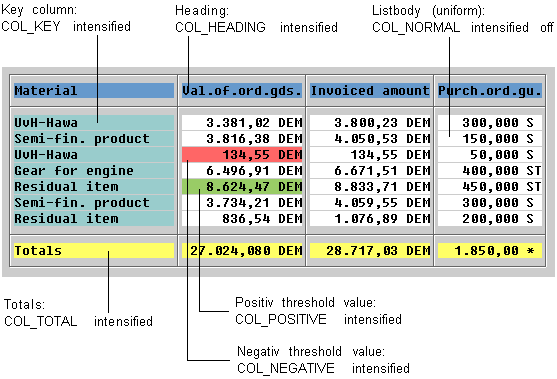
List with a one-line list body, keys, a total, and threshold values
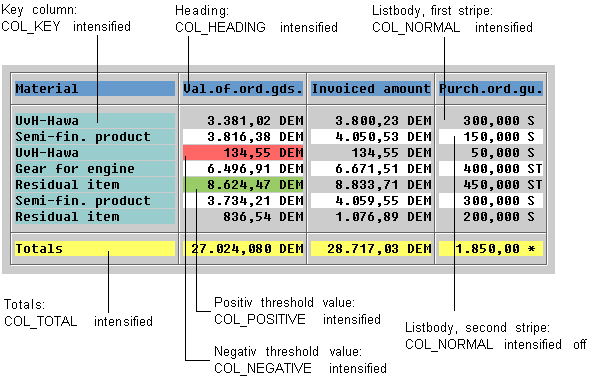
The same list with stripe pattern
Group Box
The list is displayed in a group box
Column Headers
Alignment
Column headers are aligned like the respective data columns. For example:
Arrangement, Lines
Color
Hierarchical Column Headers
If columns can be arranged in groups - possibly even across several levels - the individual levels are displayed as follows:
Lines
Color
Example
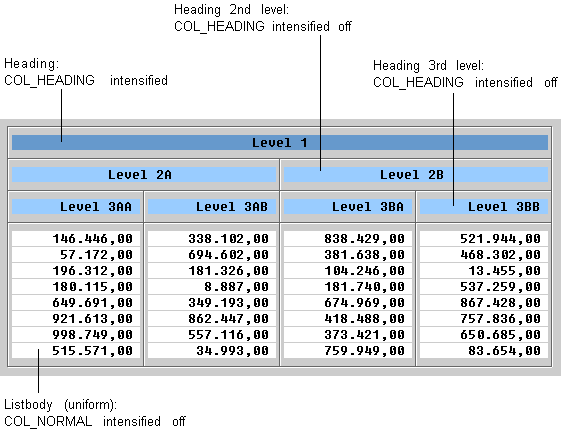
Three-level Header Hierarchy
Key Columns
Color
Exception: If the list contains too many colors, you should use the color of the list body (this also applies to all other list categories).
Column Display
Lines
Columns are separated by vertical lines.
Line Display (List Body)
Color
Separating Larger Groups of Lines
To increase transparency, you can separate different groups of lines by using horizontal lines. Such separator lines can, for example, separate different vendors or accounts.