
Field Attributes
I/O Fields in Entry Tables
For tables in which data can be entered, the input/output fields are always to be displayed
recessed , even in the display mode.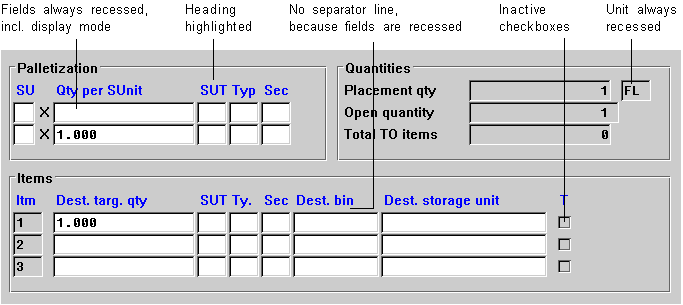
Entry Table
I/O Fields in Display Tables
For display-only tables, the input/output fields are to be displayed
flat on the screen template (flag "FixA"). You should separate the header only for these tables
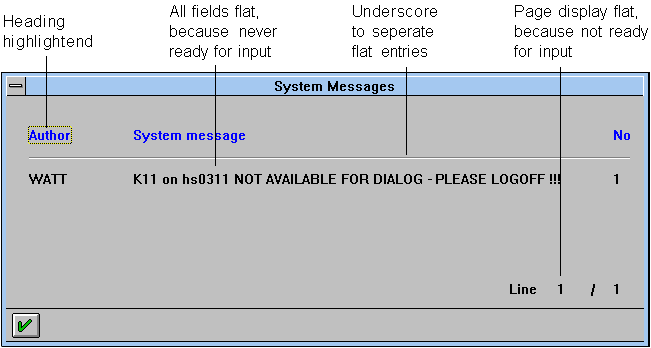
Display Table
Check Texts
Check texts in entry tables should generally be
recessed so that the row/column structure is not interrupted.
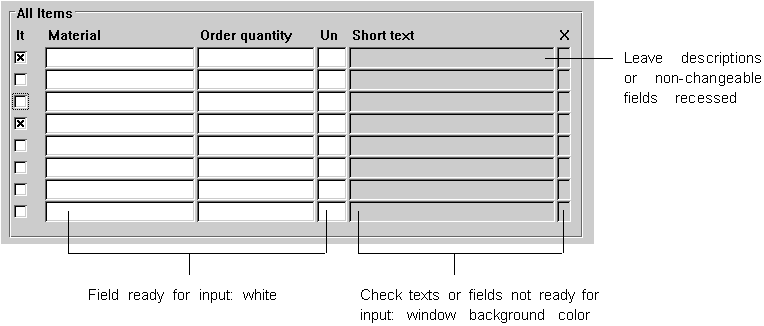
Check Texts in Entry Tables
Checkbox and Radio Button Names
Names of checkboxes and radio buttons are always to be displayed
flat (flag "FixA").Column Headers
The column headers of tables are to be displayed
highlighted (flag "Highlighted), flat (flag "FixA") and in proportional typeface . If the fields of a table are recessed, do not separate the header and the fields.Use a blank line inserted between headers and table only for multiple-line tables.
For static column headers, the flag "Highlighted" is to be set in the Screen Painter. For dynamic headings, add the flags "A" and "FixA".
Table heading names are entered under "Header" in the Data Dictionary. The length of the header is specified by the length of the output field.

If you abbreviate column titles, please observe the guidelines in Abbreviations.