
Effect on the Screen design
Other screen objects must not be obscured by the Possible entries pushbuttons.
Check texts , group boxes and right window borders are very often affected by this guideline.For
not permanently displayed Possible entries pushbuttons, three blanks are to be inserted between input/output field and check text to the right so that the displayed text is not obscured by the Possible entries pushbutton.
For
Check Texts
Check texts (explanatory texts) should not be aligned if this moves them too far away from the input/output field. For this reason, the check text should generally begin one character after the Possible entries pushbutton.
Dialog Box
If dialog boxes contain a field with a Possible entries pushbutton at the right border, the right window border is to be moved to the right by
three characters.Group Box
The right border of a group box with Possible entries pushbuttons can be defined with a minimum spacing of
three blanks to the longest field with a Possible entries pushbutton.Exceptions: I/O Fields in Step Loops and Related I/O Fields
I/O fields constitute an exception to this rule. I/O fields in step loops are
not moved three characters to the right. Related fields (for example, Value and Quantity unit or Date and Date format) should be arranged in direct succession. However, it must still be possible to click with the mouse on the field following to the right, even if the Possible entries pushbutton of the left field is displayed.The following figures illustrate these guidelines:
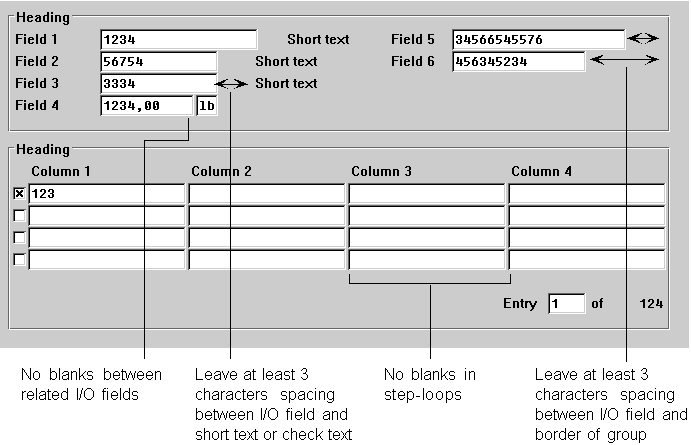
Effects of the Possible entries pushbutton on the screen design in the primary window
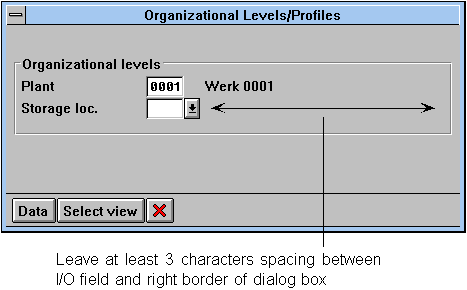
Effects of the Possible entries pushbutton on the screen design in the dialog box