
Use
Area of Application
The user can display the Possible entries pushbutton for a field by
This gives the user two options at present for calling possible entries with the mouse.
The following guidelines discuss the Possible entries pushbutton.

The "Possible entries" pushbutton will be removed from the standard toolbar as soon as all possible entries can be displayed with the Possible entries pushbutton of the individual field.
Using the Possible Entries Pushbutton
As a rule, Possible entries pushbuttons should be provided for all fields which support possible entries help (see the Technical Notes).
On the other hand, Possible entries pushbuttons must
not be implemented if no possible entries help is available (see the Technical Notes).Permanent vs. not Permanent Display
There are
permanently displayed and not permanently displayed Possible entries pushbuttons. Not permanently displayed possible entries pushbuttons appear only, if the active control indicator is positioned on the respective field.Not Permanently Displayed Possible Entries Pushbuttons
For the regular F4 input support, use the
not permanently displayed pushbuttons.Justification:
When a template is fully exploited, there are some 20 fields on the screen. About half of these fields support input help. These buttons take up some 30 characters of the screen if they are permanently displayed. Thus, they increase the occupied part of the screen - keep the occupied part as small as possible for the sake of legibility. The pushbuttons also slow down the recognition of field value and check text by reducing the separating space. Finally, they draw the attention to themselves and distract from the important information.
Initial Screens
Not permanently displayed Possible entries pushbuttons are also to be used for initial screens or very empty screens.
Justification:
The user cannot understand why the Possible entries pushbutton is permanently displayed in one case and not in the other. Furthermore, matchcode fields only have a not permanently displayed pushbuttons nowadays so that they can be used in step loops. But there are many matchcode fields on the initial screen and they would have a permanently displayed pushbutton.
Permanently Displayed Possible Entries Pushbuttons
Permanently displayed Possible entries pushbuttons may only be used if the following requirements are met:
Justification:
The conditions referred to are displayed in other user interfaces by a so-called pop-up menu, which is not yet available for SAP. The arrangement described here is the closest to a display in a pop-up.
Display Mode
The same guidelines are valid in the display mode. Not permanently displayed Possible entries pushbuttons can be called in the display mode either with the mouse or the active control indicator (
CTRL arrow key).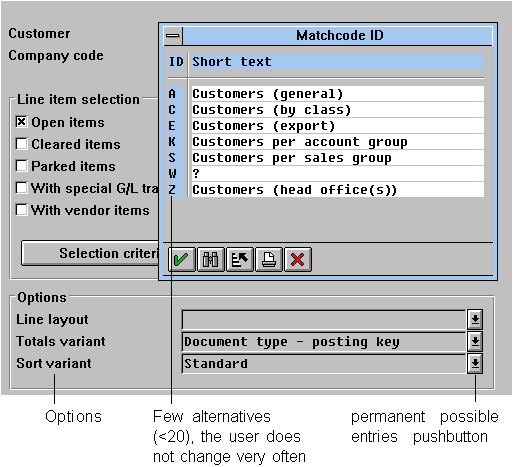
Criteria for permanently displayed Possible entries pushbuttons
The following table sums up the guidelines:
|
No possible entries |
Possible entries | |
I/O field |
No possible entries pushbutton |
Not permanently displayed possible entries pushbutton |
Output field |
No possible entries pushbutton |
Not permanently displayed or permanently displayed possible entries pushbutton |