Programming tab strips
To create a tab strip in the R/3 System, make sure to meet the following prerequisites:
Scrolling in the tab strip
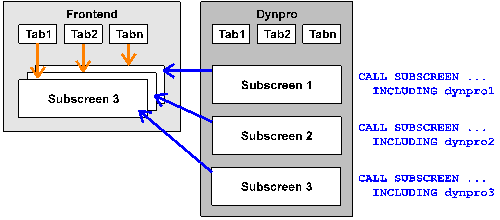
The GUI element Tab strip offers two alternatives for scrolling. In both cases, the tab titles are defined as pushbuttons and the tab page as subscreen. However, in one case, scrolling is achieved via the backend (the application server), in the other locally in the GUI.
Scrolling on the application server
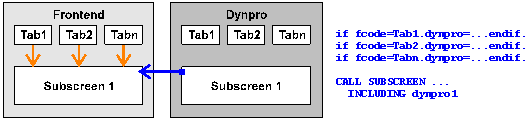
Each tab title is assigned the same subscreen area which is embedded at PBO time. When a tab title is chosen, the PAI event is triggered, and the ABAP flow logic must activate the associated tab title page based on the function code, and assign the correct subscreen screen to the subscreen area.
Since each time a tab title is chosen, the PAI event is triggered, workload is placed on the application server. Any entry checks, however, are only carried out for the current tab strip page.
Scrolling in the SAP GUI
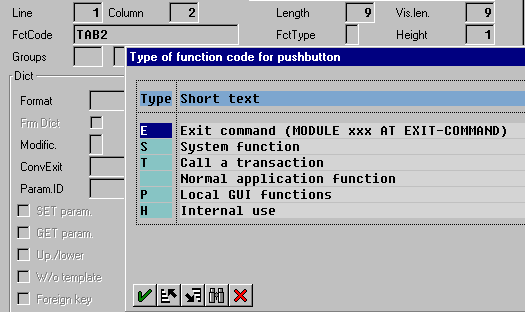
Define an individual subscreen area for each tab title. Define the function codes of the titles using the type "P tab strip code"
In the flow logic, include all subscreens used into PBO. This ensures that all tab pages exist locally in the GUI.
If the user chooses a tab title, the system scrolls between the tab strip pages in the SAP GUI. The entire tab strip behaves like a large screen. In particular, when a tab title is chosen, the system does not trigger the PAI event and does not transport any data. On the one hand, this enhances the performance of the tab strip, but on the other hand all entry checks of the entire screen take place in the case of user actions that trigger the PAI event. If the user performs an action on a tab strip page, it may be the case that the system goes to a required field on another tab strip page that has not been filled.
This procedure is therefore better suited for screens that display data and not for screens that accept user entries.