
Gathering Several Blocks to Form a Block Group
Number of Blocks, Lines and Fields per Block Group
Ideally, a block group contains only one block. If this is not possible, limit block groups to two or three blocks with six or seven lines at most and a total of ten to twelve input fields.
If there are a large number of fields, try to group them in two block groups.
Group Heading/Group Box of a Block Group
Identify a block group with a "group box" and a group heading.
You can also include dynamic fields in the heading if these are not too long (less than 15-20 characters).
Exception
If the contents of a block group is too heterogenous, you should omit the heading. Although headings such as "Other data" are perfectly acceptable in such circumstances.
Header data do not have a heading. They start in the first line of the work area (see illustration SAP GUI design elements for fields).

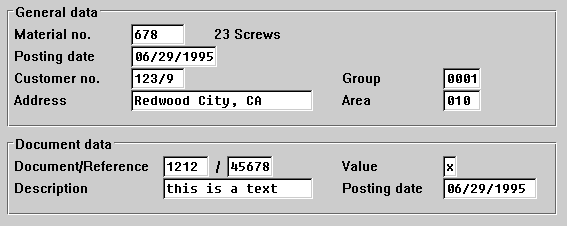
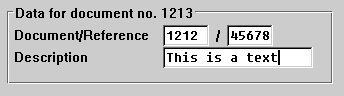
In Example 2, a variable field is incorporated in the heading.
Using Separators In Block Groups
Do
not use further separator lines within a block group. Do not use, for example,Use blank lines to separate areas in block groups.
Minimum Horizontal Spacing Between Two Blocks in a Block Group
Leave at least five characters between two blocks.
Exception: If the longest field of the left block will most likely not be filled, you can reduce the space between blocks to one character.
Maximum Horizontal Spacing Between Two Blocks of a Block Group
Do not use a spacing of more than 10 to 15 characters between two blocks.
If you use
group boxes, you can have blocks start at a fixed location, for example, at column 40. This can contribute to interface design consistency between applications.