
Arranging Fields According to Screen Sequence
Defining the Screen Sequence
The sequence of the screens should correspond to the user's work process. Place important fields on the earlier screens of a task.
Accessing Individual Screens of a Screen Sequence
Allow the user to address individual screens as variably as possible and to move backwards and forwards in a screen sequence.
Although this guideline affects the navigation between screens rather than the scroll design, it nevertheless affects the arrangement of information on screens.
Arrangement and Number of Fields on a Screen
A screen in a screen sequence should correspond to a concept or a user sub-task. Display only the data that are essential for a taskin hand in the work area. Additional information should only be available on request or on a separate screen.
Arranging Fields in the Work Area
Field arrangement criteria:
Effects on Perception.If no special design elements such as different colors have been used in a work area, the attention of the user is distributed in accordance with the percentages shown in the following illustration. One-column work areas are thus preferable to two-column work areas.
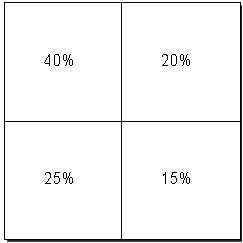
Distribution of Attention
Keep Templates Consistent
Make sure that all colleagues involved in designing the screens for a particular task, all follow the same criteria. If a table has a header on one screen, the header is to appear on all screens in the task.
Efficiency vs. Good Design
In the event of conflict, an efficient dialog procedure has priority over an aesthetically pleasing design of the work area.