
Scrollable Input/Output Fields
Release R/3 3.0 introduces horizontal scrolling for input/output fields: The visible length of an input and/or output field can be smaller than the defined physical (ABAP/4 Dictionary) length. The user can scroll through the contents of the field using the mouse or the keyboard.
Visible and Defined Physical Length
Scrollable input/output fields can be created by specifying a visible length value in the Screen Painter which is smaller than the defined physical length (see
Technical Notes).Purpose
Scrollable input/output fields require less space on the screen because their visible length is smaller than the defined physical length. They are to be used when space on a window is limited. However, the scrollable field displays only a part of the full information and the user has to scroll to read the complete contents. For that reason, scrollable I/O fields should only be used when space reasons require them and they do not constitute much of an disadvantage for the user.
Appearance
The right border of scrollable I/O fields is interrupted, with input field also the left border.
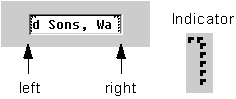
Scrollable input field
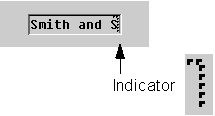
Scrollable output field
Design Guidelines
In general, scrollable I/O fields should only be used if there is not enough space on a screen to display the full (physical) length of a field. As far as arrangement and appearance is concerned the guidelines listed under
Fields - Positioning apply.Input Fields
The visible length can be smaller than the physical length to cover extreme field length requirements. As a rule, the visible length should, however, be long enough to display all important characters.
If possible, the physical length should always correspond to the visible length because the user needs to see the complete figures to avoid errors and/or to recognize them immediately.
Input fields which allow the user to enter texts and descriptions can be displayed shorter than their physical length. You should, however, choose a length which requires only very little scrolling or which still allows to see the most significant characters.
Output Fields
The visible length can be shorter than the physical length, but you shold define a length that avoids unnecessary scrolling. The field should have a length which still allows the user to understand the meaning of the field.

Check text
The arrow indicates that the check text is scrollable. Check texts are the foremost candidates for scrollable fields.

Check texts should always be available on a screen because they help the user to understand the meaning of the field. Scrollable output fields can even display check texts in situations when space usually does this not allow.
Do Not Use Scrollable Fields
Scrollable fields should not be used for date fields, quantity and currency specifications.