
Icons on Pushbuttons in Dialog Boxes
With very few exceptions, the functions of the
ENTER key are always represented as icons. This also applies to the Cancel function.Illustration
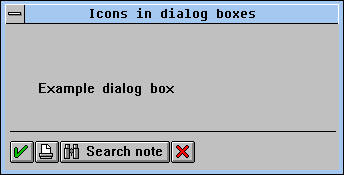
Icons in the dialog box
Appearance
The Default Key (
ENTER )In general, the
ENTER key is only assigned the checkmark icon for the functions OK, Continue, Close or Execute.When the Choose and/or the Configure functions are assigned to the
ENTER key you should use the icon with a text label, for example "Icon_OKAY" plus text "Choose". For specific functions on the ENTER key such as Delete, Check, Refresh or Find use the checkmark icons plus text.Cancel
Cancel
(the last button in the application tool bar) is only assigned an icon.Other Functions
If there is enough room, add text to the icon. Otherwise use an icon without a text label.
Exceptions
If the dialog box displays text only (for example, confirmation prompts), you should use an icon with a textual label. Messages dialogs do not have icons on the pushbuttons.
|
OKAY |
Execute, Continue |
|
CANCEL |
Cancel |
|
|
|
Specific icons for functions in dialog boxes
Sequence
As specified above:
ENTER button - dialog box specific pushbuttons - CancelPushbuttons which have an icon but no text should be positioned directly after the
ENTER button. All other buttons or icons follow.


