
Pushbuttons with Icons on Initial Screens (Tools)
On initial screens, the text of the following generic pushbuttons (see illustration) is assigned an icon:
Create, Change, Display, Display <-> Change, Execute, Replace, Copy, Delete, Find.

This applies basically to initial screens of Basis applications, where above mentioned functions are implemented as pushbuttons with no fixed position.
The illustration shows how the pushbuttons are to be arranged:
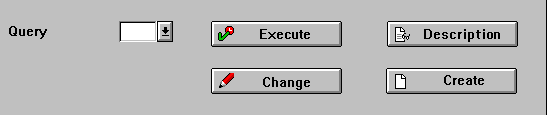
Initial Screen example
Appearance and Width of Pushbuttons
If there is enough room on initial screens, these functions are always displayed as icons with a textual label unless there is not enough room.
|
CREATE |
Create |
|
REPLACE |
Replace |
|
CHANGE |
Change |
|
COPY_OBJECT |
Copy<object> |
|
DISPLAY |
Display |
|
DELETE |
Delete |
|
TOGGLE_ |
Display <-> Change |
|
EXECUTE_ |
Execute |
|
SEARCH |
Find |
|
SEARCH_NEXT |
Find next |
Icons for general functions on initial screens
Application-specific Functions
For the Workbench you can use icons for the following functions:
Activate, Generate, Check, Test; List icons, Navigation stack, Where-used list
|
ACTIVATE |
Activate |
|
ICON_LIST |
Icon list |
|
GENERATE |
Generate |
|
STACK |
Stack |
|
CHECK |
Check |
|
REFERENCE_ |
Reference list |
|
TEST |
Test |
|
TRANSPORT |
Transport |
|
COMPARE |
Compare |
|
TOOLS |
Tools |
|
RENAME |
Rename |
|
BREAKPOINT |
Breakpoint |
Special functions (Workbench)
You can use the following pushbuttons for representing networks and hierarchies:
|
PREVIOUS_ |
Previous node |
|
NEXT_NODE |
Next node |
|
PREVIOUS_ |
Previous hierarchy level |
|
NEXT_HIER_ |
Next hierarchy level |
|
TREE |
Tree |
|
INSERT_ |
Insert relation |
|
FINAL_DATE |
Final date |
Special icons for networks


