
Arrangement on Initial Screens
General Notes
Initial screens are a special type of screen in a task. They are used to control the following task or evaluation. On an initial screen, the respective object is named and specified. Often, the screens to be displayed or the required processing method is chosen on initial screens. This controlling information and actions should be displayed directly in the work area of the initial screen because they display the central purpose of the initial screen.
On the other hand, these control functions are in the background on the following data screens of the task as compared to the task-specific information of the task. They are therefore not located in the work area of the data screen but in the menu and in the application toolbar.
Tool Tasks vs. Business Tasks
Tool tasks and business tasks differ with respect to the number of processing methods possible in a transaction. This difference is a result of the detailed user authorizations in the tasks. This differentiation should remain, but results in a slightly different design of the initial screens of the two task types.
Initial screens of
customizing transactions should be designed following the guidelines specified for tool tasks.Arrangement
The object components and processing methods that can be freely accessed (tools or screens) can be positioned in the work area on initial screens of tool tasks.
The object components or processing methods displayed in the work area are
not displayed in the application toolbar on the initial screen. The application toolbar can be equipped with other less important functions.The object components or processing methods displayed in the work area, on the other hand, are always listed additionally in the menu so that they are also available on the data screens.
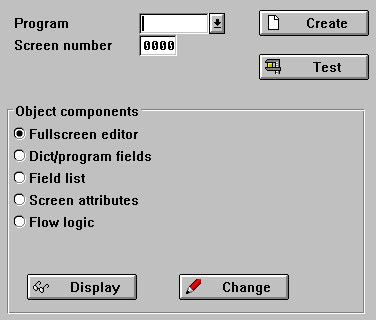
Pushbuttons which refer to the entire object (above) and to object components with single selection (below)
Displaying
Object Components
Processing Methods
The processing methods possible within the selected transaction are only located in the work area in the tool tasks. There, they are always to be accessed with a pushbutton. If the processing methods refer to the entire object, the pushbuttons are to positioned to the right of the input field of this object. If they refer to individual object components, they are to be arranged within or near the object components (see above).
If there is only one processing method, no Edit key is to be provided in the work area.
No more than ten pushbuttons should ever be positioned in the work area. Otherwise, transparency is lost and functions can no longer be quickly found.
If necessary, groups are to be separated from one another with a group box.
Initial screens should not contain much more elements than the initial screen shown in the following illustration.
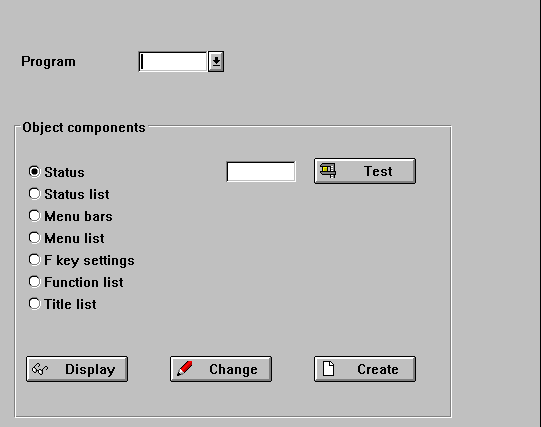
Initial screen with pushbuttons