
The Screen Calling the Task
Function
On this screen, the user chooses a class of objects and then specifies the function to be executed. The user can do this in one of the following ways:

The RF application menu Accounts Receivable contains the items Create master records or Display document. The Logistics application menu (Materials management - Purchasing) contains the items Change purchase order or Display RFQ/quotation.
Many tasks are designed this way, for example, "Maintain RP master data", "Create accounting document" or "Open ABAP/4 program".

From the user's point of view, the process described here is actually the same as the one described first. It is listed separately here because the technical background is different.
Navigation Options at Lower Hierarchy Levels
As described above, the user either chooses a pull-down menu item or a function key or enters a fast path and chooses
Continue (Function).Navigation Options to "the Screen Calling the Task"
In addition to the branching possible within "the screen calling the task", the Exit function always branches to "the screen calling the task" (providing this is technically possible and meaningful).
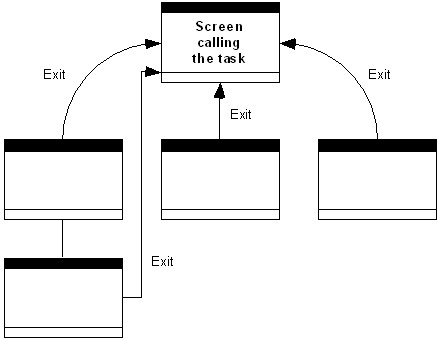
Exit navigates to "the screen calling the task", if possible.