
Special Character '*' in the Selection Field
Previous Situation
Previously, the task program could flag the objects edited or viewed in detail by the user, by entering '*' in the selection field.
The user could not manually enter the '*'. Other special characters for indicating a specific status were also not allowed.
Graphical Checkboxes
The implementation of graphical checkboxes has changed the situation. For technical reasons, you can currently not use asterisks in graphical checkboxes to indicate the "Edited" status. A separate column must be implemented in front of the checkbox. The one-character field receives the flag FixA. Otherwise, the guidelines listed below still apply.
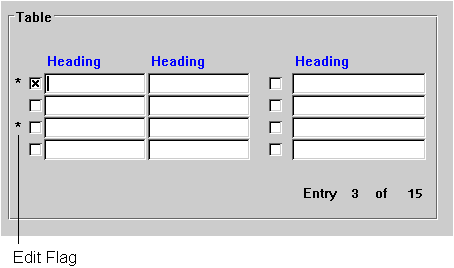
The "Edit" flag is displayed in a separate column in front of the checkboxes

You see a table structure with items of an order document. You select five items and enter the account assignment to three items in 'fullscreen'. After entering the third item, you return to the table structure. The first three items show an '*' in the "Edited" column, the other two a blank.
When using an '*', be aware of the following differences:
Repeated Display of '*' If Only One Action is Possible
If only one action can be performed on the objects of a table structure (for example "Choose"), once set, '*' can remain set even though the user toggles several times between the table structure and the detailed view.
You are working with an order document and want to copy items from another order document into your current document. You therefore select and copy items in a table structure which shows you the items of the "old" reference document. Asterisks '*' are set as reminders in the fields of the table structure to indicate which items of the "old" document you have already copied.
You continue working with the "new" document and want to copy further items. If you display the table structure with the items of the "old" document, the asterisks '*' are still there. Even if you access the table structure of the "old" document five times, the '*' do not disappear; instead, new ones are added if you copy further items from the "old" document.
Once-Only Display of '*' If Several Actions are Possible
If several actions are possible on the objects of the table structure (for example "Maintain the account assignments to this item " and "Maintain the partners to this item"), you only see the '*' when you return to the table structure for the first time. When you return to the table structure a second time, the asterisks '*' are no longer there.
You see a table structure with items of an order document. You select three items and enter the account assignment to them. When you are finished, you return to the table structure and see a '*' as a reminder of the three items you have processed.
You now enter the partner data for four other items. When you return to the table structure again, you see the '*' only for the items you have just processed. The '*' from the first processing with the account assignments are no longer there.

You can optionally implement a "Select again" function to reselect all lines with '*'.