Flexible Functions
Flexible Functions
Use
Flexible
Functions broaden the methods for quantity calculations by making it possible to run evaluations using internal tables. For example, internal tables can contain business transactions for routings, components of a BOM or costing items. As the data accessed becomes more detailed, it is possible to evaluate several BOM components of production orders or material components of a network activities.Flexible functions also allow you to further process the results after checking specific, user-defined requirements.
Flexible functions consist of the following components:

If you do not define a condition, the formula evaluates all entries on the internal table.
Activities
You define the flexible functions in the quantity editor of the template. Choose a function with table assignment from the function tree, and enter the conditions and formulas.
For more information, see
Defining Flexible Functions.Example
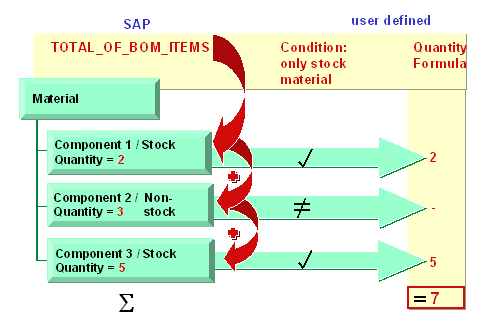
A flexible function (TOTAL_OF_BOM_ITEMS) evaluates a BOM. The system checks whether each BOM component fills the condition "item category = stock material (condition is entered by the user). If the condition is filled, the values are calculated per component through a formula entered by the user. The indivídual values are then added (set in the flexible function).