 Content Models
Content Models
The individual SAP applications create meta data models for the various types of documents that they use. Relationships exist between these documents. These models are called content models.
A content model contains a description of the characteristics of the individual content entities in KPro, at an abstract level. The different types of content are represented on the documents in the content model and managed. End user documentation and scanned documents are possible types of content.
KPro Content Model
The KPro content model contains three levels for administrative data. The KPro content model is therefore also called a three-level content model:
Several physical documents are assigned to a logical document. A physical document represents an individual document, while a logical document represents a collection of documents.
A document can consist of various files, meaning that one or more components can exist for each physical document. Each component, in turn, is associated with one content unit
KPro Content Model
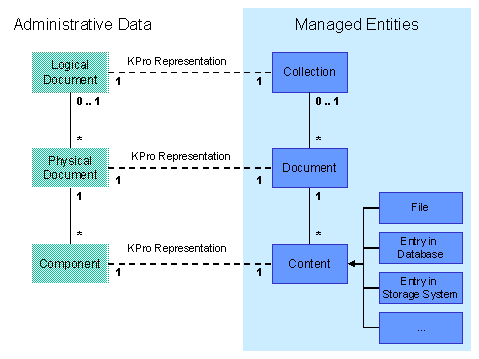

KPro also allows two-level content models. In this case, an application using KPro does not need any logical documents. Only components and physical documents are used.
Application-Specific Content Model
In order to use the KPro document infrastructure, applications can develop their own content models. KPro accesses these application specific content models at runtime and uses the meta information they contain to execute the required services Applications can therefore define their own attributes or certain types of versioning, for example.
Firstly, you decide whether to use a two or three-level content model. If it is possible that at some point, the documents will be changed or other versions of the documents will be created, the three-level content model is used. Possible changes are changes to the content, the language and the format. The two-level content model is only intended for documents that are not to be changed and for which no versions are to be created.
The three-level content model is also recommended for scenarios where more than one context-dependent instance of a particular physical document exists simultaneously.
As soon as you have decided whether to use the two or three-level content model, the content model itself can be made by following the following steps:
In the last step the rules for creating relationships of certain classes between instances of logical and physical documents are defined. KPro accesses this information at runtime within the application-specific content model, to determine whether the required activity is permitted. These rules can be used to catch unpermitted relationships between content versions of physical documents, for example.
You can create your own content model using the Document Modeling Workbench (transaction DMWB).