 Setup of Country-Specific Organizational Units
Setup of Country-Specific Organizational Units
Purpose
When you first install and customize the SAP System, you have to set up your organizational units (see
 Organizational Units and Basic Settings). You can speed up this process using the
country templates, which help you set up the organizational units so that they are suitable for use in a particular country.
Organizational Units and Basic Settings). You can speed up this process using the
country templates, which help you set up the organizational units so that they are suitable for use in a particular country.
Process Flow
When you set up your organizational units, you have to:
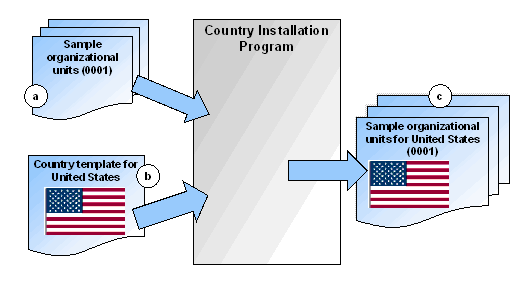
To do so, you run the

To do so, you use the appropriate Implementation Guide (IMG) activities under Enterprise Structure. It is these copies (d) that you will use in production operation and which you now have to customize. When you copy the organizational units, you have to give them a new name. In the diagram, the organizational units for the United States have been renamed USAA.
The original sample organizational units (c) will be overwritten the next time you run the Country Installation Program and must not be used for any purpose other than with this report.
Repeat steps 1 and 2 for each new set of organizational units you want to set up (see also the
Result
At the end of the process, you have made the basic settings for all the organizational units you need. You can now proceed to configure them properly.