Letters
Letters
Definition
Standard letters that are used for correspondence with business partners of the Real Estate component.
Use
You use the standard letters to adjust the correspondence with business partners of real estate- specific applications to your own Company’s requirements.
You make the adjustments in Real Estate Customizing.
Structure
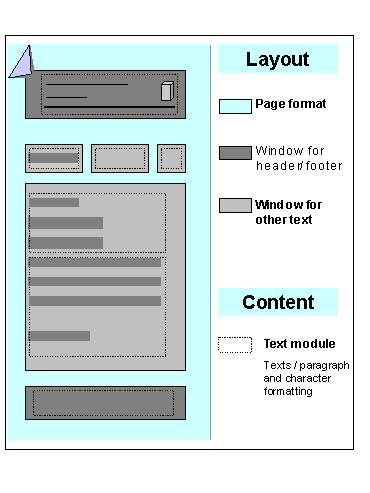
A letter consists of the following parts: |
Processing in the R/3 System: |
Page format for instance A4, US Letter, Portrait, Landscape... |
Transaction SE71 (edit forms) Texts that are to appear in fixed positions on a page (for instance the letter heading for the company code) should be included directly in the form. You then do not need to create these as separate text modules for the letter in Customizing. |
Windows for the header and footer These can be positioned anywhere on the page format with the required size |
|
Other text windows Any number of text windows can be positioned anywhere in the page format with the required size |
|
Text modules Any number of text windows can be positioned anywhere on the page format with the required size. You create texts language-dependently, that means multilingual texts can be formulated and printed; you may also insert graphics, for instance your company logo; you can also copy data from the R/3 System to the text module (for instance the name of the tenant, address, number of the lease-out etc.) |
|