 Agent as Attribute of SAP Organizational Object
Agent as Attribute of SAP Organizational Object
Use
Organizational entities
, which are specified in the master data of a business object, are usually supported by positions or organizational units, which may need to be addressed as the recipient of a work item. The following description illustrates the procedure used to determine these agents on the basis of organizational entities, and how they are indirectly available as attributes of the business object.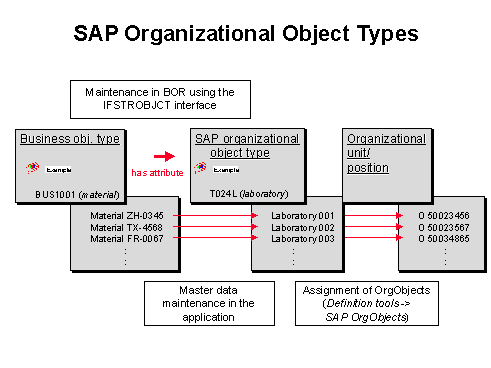
Prerequisites
Business Object Type and SAP Organizational Object Type
From a technical perspective, organizational entities are represented by
SAP organizational objects in the Business Object Repository.SAP Organizational Object Type
and the IFSTROBJCT InterfaceEach SAP organizational object type (example: design office) should support the
IFSTROBJCT interface. As a result, this object type inherits the agent attribute. This attribute returns the position or organizational unit that is related to the SAP organizational object.Many SAP organizational object types supplied by SAP already support the
IFSTROBJCT interface.You only need to enhance a subtype of the corresponding object type with the
IFSTROBJCT interface if this is not the case. Programming is not required.Activities
Relationship Between Organizational Plan and SAP Organizational Objects
For more information, see
Assign SAP Organizational Objects.Responsibility for a Step
When responsibility is determined for a step as part of a workflow definition, the agent can be derived from the workflow container and specified using a multi-level expression of the following type:
&<business object type>.<SAP organizational object type>.agents&.

On the entry screen for Responsibility, select Container and enter &Material.Labor.Agents&.

This procedure means there is no need to define and use a corresponding role.
Error Handling
When this step is performed, the following error situations can arise after the expression has been evaluated:
If one of the above error situations arises, the step is instantiated as a work item and addressed to all of the possible agents for the single-step task.
Reference to Related Topics