 Generating a Nota Fiscal in Invoice Verification (MM)
Generating a Nota Fiscal in Invoice Verification (MM)
Preparation in Purchase Order
Nota fiscal creation in Invoice Verification is only possible with a reference to a purchase order (direct or indirect reference).
R/3 requires special Brazilian fields when creating a purchase order. The information is either derived from the material master (in case of material items) or must be entered (in case of non-material items).
The required fields include:

These fields are not relevant for service.
Goods-Receipt-Based Invoice Verification
As shown in the
Nota Fiscal Integrated into Invoice Verification, only one nota fiscal is possible for one invoice/goods receipt. Therefore, it is recommended to use the R/3 function Goods receipt based invoice verification.For more information about Goods receipt based invoice verification
, see the R/3 standard documentation.Exception: Conhecimento for Multiple Notas Fiscais
In the Logistics Invoice Verification selection screen, you can specify which documents (purchase orders, delivery notes/notas fiscais) you want to create a conhecimento for.
If you have not posted an invoice for a goods receipt, the system does not allow the material lines to be included in the conhecimento. You must suppress these lines in the Logistics Invoice Verification selection screen manually.
The function is based on a new document type (7 – conhecimento for multiple notas fiscais). It is similar to document type 4, except that there is no check as to whether the two documents correlate directly.
To activate this function, create a new nota fiscal type by copying it from C1, and assign the document type Conhecimento for multiple notas fiscais.
Conhecimento for Multiple Notas Fiscais
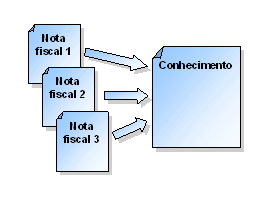
Nota Fiscal Number
For incoming Notas Fiscais, it is necessary to enter the nota fiscal number given by the issuer. There are two ways to enter the nota fiscal number:
The following input formats are allowed:
|
Where |
xxxxxx |
® |
Nota fiscal number | |||
|
sss |
® |
Series (without subseries) | ||||
|
S |
® |
Series (letter between A and Z) | ||||
|
uu |
® |
Subseries | ||||