 Important Table Structures
Important Table Structures
Description of Data Type soi_range_list
The methods for setting and getting data from a named range use the separation between the description of the range and the data itself. Note that the sequence must be observed both in the range description (structure
soi_range_list ) and in the data (structure soi_generic_table ). This means that you must list all data from the first range before you can insert data into the second range.Structure soi_range_list
Field |
Type |
Description |
name |
C |
Name of the range |
rows |
C |
Number of rows |
columns |
C |
Number of columns |
code |
C |
Function in the range: |
The name identifies the range in the worksheet. This is, in effect, the key with which you always access the range. The size of the range is always given in columns and rows.
Some functions allow you to access a specific area in a worksheet. You can see from the table which functions are implemented.
Description of Data Type soi_generic_table
In this table, you can save data from the range and use the
 Data Provider to transfer it to or retrieve it from the frontend. The data is transferred directly as a string with no type information.
Structure soi_generic_table
Field |
Type |
Description |
row |
C(4) |
Row |
column |
C(4) |
Column |
value |
C(256) |
Value |

The sequence of the data must correspond to the sequence of the range description, for example,
range1 before range2 . The data table must then contain the data for the ranges in the sequence range1 range2 .Description of Data Type soi_format_table
Use this table to specify the format of a range. The format consists of various attributes, all of which can be set in a single line. Each variable attribute corresponds to a column of the structure.
To create a work area for this table, use the structure
soi_format_item as a reference.
The entry "-1" always indicates that the existing attribute value for the range should not be changed.
Structure soi_format_table
Field |
Type |
Description |
name |
C(256) |
Name of the range |
front |
I |
Font color (see color palette) |
back |
I |
Background color (see color palette) |
font |
C(256) |
Name of the font family. The following values are permitted: 'Arial' 'Courier New' 'Times New Roman' |
size |
I |
Font size '-1' : Unchanged |
bold |
I |
'1' : Bold'0' : Normal'-1' : Unchanged |
italic |
I |
'1' : Italic'0' : Normal'-1' : Unchanged |
align |
I |
Alignment: |
frametype |
I |
Control byte for setting the frame '-1' : Unchanged |
framecolor |
I |
Frame color (see color palette) '-1' : Unchanged |
currency |
C(3) |
ISO standard currency code |
number |
I |
Specifies the format of a cell in a range.
|
The following colors are permitted:
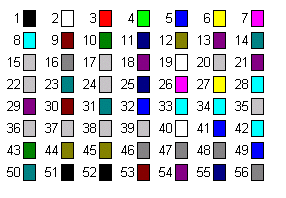
The control byte
type contains the following bits. If a bit is set, its corresponding line is drawn. You can set the thickness of the line to one of four levels using bits 6 and 7.Bit |
Description |
0 |
Sets the left margin |
1 |
Sets the top margin |
2 |
Sets the bottom margin |
3 |
Sets the right margin |
4 |
Horizontal line |
5 |
Sets the left margin |
6 |
Thickness |
7 |
Thickness |
Description of Data Type soi_full_range_table
Each line of a table with the type
soi_full_range_table specifies the full definition of a range. The individual lines have the data type soi_full_range_item .Structure soi_full_range_table
Field |
Type |
Description |
name |
C(128) |
Name of the range |
top |
I |
Top row of the range |
left |
I |
Leftmost column of the range |
rows |
I |
Number of rows in the range |
columns |
I |
Number of columns in the range |
sheets |
C(128) |
Worksheet on which the range is defined |
Description of Data Type soi_cell_table
Each line of a table with the type
soi_cell_table specifies the attributes of a range of cells. However, no range name is used. Instead, the cell area is defined by its starting position and the number of rows and columns it contains.The individual lines have the data type soi_cell_item .Structure soi_cell_table
Field |
Type |
Description |
top |
I |
Top row of the range |
left |
I |
Leftmost column of the range |
rows |
I |
Number of rows in the range |
columns |
I |
Number of columns in the range |
front |
I |
Font color (see color palette) |
back |
I |
Background color (see color palette) |
font |
C(256) |
Font. The following are permitted:
|
size |
I |
Font size Use -1 if the font size is to remain unchanged. |
bold |
I |
|
italic |
I |
'1' : Italic'0' : Normal'-1' : Unchanged |
align |
I |
Alignment: |
frametype |
I |
Control byte for setting the frame '-1' : Unchanged |
framecolor |
I |
Frame color (see color palette) '-1' : Unchanged |
currency |
C(3) |
ISO standard currency code |
number |
I |
Specifies the format of a cell in a range.
|
decimals |
I |
Number of decimal places |
input |
I |
|

The following colors are permitted:
Description of Data Type soi_dimension_table
You can use an internal table with this type to identify a range by specifying the coordinates of its top left-hand corner, its length, and its width. The lines of
soi_dimension_table have the line type soi_dimension_item .Structure soi_dimension_item
Field |
Type |
Decription |
top |
I |
Topmost row of the range |
left |
I |
Leftmost column of the range |
rows |
I |
Number of rows |
columns |
I |
Number of columns |