Registering the Mlunxsnd Program
Registering the Mlunxsnd Program
Use
If you have created an RFC destination with the activation type registration for program Mlunxsnd in the R/3 System, you must register the program to an R/3 gateway. The program is then used as the RFC server.
An RFC server registered in the R/3 System maintains a constant connection to an R/3 gateway, which forwards all outgoing RFC calls. The RFC server registers for the R/3 Gateway with a unique program ID, via which the RFC link is identified in R/3.
Activities
You have two possibilities for registering the RFC destination for the SAP Gateway:
The following information is specified at registration:
Parameters in the file saprfc.ini |
Option when called up directly |
Description |
Example |
DEST |
Name of RFC connection |
SIMG_Mlunxsnd | |
TYPE |
The connection type is registration R at the activation type. |
R | |
PROGID |
-a |
User defined name, for example, <host name>.<program name>.<system name><client> |
hs3333.mlunxsnd.c11001 |
GWHOST |
-g |
R/3 Gateway host name |
hs3333 |
GWSERV |
-x |
The Gateway service port is usually specified in the form sapgw<system number>. |
sapgw00 |
RFC_TRACE |
-t |
Specifies whether a trace of RFC connections should be written to the file Dev_rfc.
This file can be very large. |
0 |

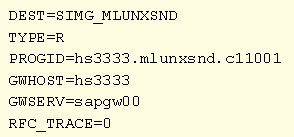
Example for the entry in file Saprfc.ini:
The file Saprfc.ini must be located in the work directory of the program Mlunxsnd. Under Windows NT, this is usually the directory in which the program itself is located.
Information on registration via file
 Saprfc.ini can be found in the documentation BC - The RFC API.