 <-> (Equivalence)
<-> (Equivalence)
You use the <-> (equivalence) operator when both statements must be true or both statements must be false for the combined statement to be true.

1. |
(1 = 1) <-> (2 + 2 = 4) (TRUE) |
2. |
(1 = 1) <-> (10 < 6) (FALSE) |
3. |
(10 < 6) <-> (1 = 1) (FALSE) |
4. |
(2 + 3 = 4) <-> (10 < 6) (TRUE) |
The following table is the truth table for the <-> (equivalence) operator.
Statement A |
Statement B |
A <-> B |
TRUE |
TRUE |
TRUE |
TRUE |
FALSE |
FALSE |
FALSE |
TRUE |
FALSE |
FALSE |
FALSE |
TRUE |
In the FI-SL application component, you use the <-> (equivalence) operator when you want the system to check that both statements are false for the incoming data or both statements are true for the incoming data (before the system uses the data).
The following graphic uses a truth table for the <-> (equivalence) operator to determine if a transaction is selected for a report.
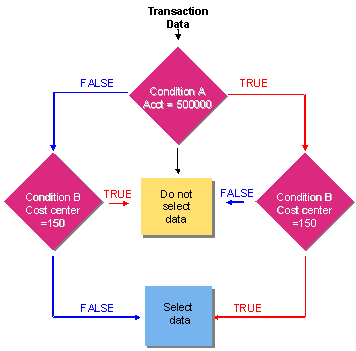
If the transaction is for account 500000 and for cost center 150, then the combined statement is TRUE and the data is selected for a report. If the transaction is not for account 500000 and cost center 150, then the combined statement is TRUE and the data is selected for a report.
If the transaction is not for account 500000 and for cost center 150, then the combined statement is FALSE and the data is not selected for a report. If the transaction is for account 500000 but not for cost center 150, then the combined statement is also FALSE and the data is not selected for a report.