 Defining Reports for the Report/Report Interface
Defining Reports for the Report/Report Interface
Use
The report/report interface allows you to call reports from other R/3 application components when you output your report data. You can call up report portfolio reports, drilldown reports, transactions, receiver reports, Report Writer reports, Report Painter reports, and ABAP programs.

If you define reports for the report/report interface in both the report group header and in the report group’s library, the system uses the reports that you have defined specifically for the report group.
Example
Your system is delivered with an ABAP program called RGGD1300, which displays line items for the FI-SL summary tables. The program reads the data from the FI-SL line item table and outputs a list of the line items.
You can call up program RGGD1300 directly (System
® Services ® Reporting) or from the report/report interface if it is defined as a receiver report for another Report Writer report. In a report that displays totals, you can then display the line items for a specific totals record.To call program RGGD1300 as a receiver report to display line items for totals data in a report:
Procedure for Example
 Header.
 The screen Change Report Group: Header appears.
 .
.The Report Writer Report Selection dialog box appears.
A dialog box appears, listing the possible report types.
The receiver reports you assign can be report portfolio reports, drilldown reports, transactions, Report Writer reports, and ABAP programs. This enables you to call receiver reports from other R/3 application components once you have output your report data.

You should normally assign receiver reports to the report group.
In this example, we are using the ABAP program RGGD1300 as the receiver report.
 . The Add ABAP/4 Report dialog box appears..
The default text of program RGGD1300 is displayed in the Assign Reports dialog box.
Additional Processing Functions - Dialog Box for Report/Report Interface
Function |
Choose |
Save receiver report for report/report interface |
|
Add receiver report to report/report interface definition |
|
Delete entry in report/report interface definition |
|
Insert report from another system (cross-system report assignment). You log on to the other system, select a receiver report, and transfer it to the sender system. |
|
Select one or more receiver reports for further processing (for example, to move the selected report to another position in the list) |
|
Move selected receiver report to another position in the list. If the cursor is positioned on a receiver report, the selected report is inserted before this receiver report. If the cursor is not positioned on a receiver report, the selected report is inserted at the end of the list. |
|
Display default text of a receiver report if you have previously overwritten the default text of the report. Note: when you first enter a receiver report, the default text for this report is automatically displayed. |
|
Display all reports to which the specified sender report is assigned as the receiver report. If you activate this function again, the original list is displayed. |
Sender <-> Receiver |
Display technical information on the receiver report(s) (for example, the report tool and the technical report name) |
Technical names on/off |
Documentation on displaying and maintaining the report assignment in the report/report interface |
|
 to save your entries.
Example
The Report Writer uses ABAP program RGGD1300 as shown in the following graphic:
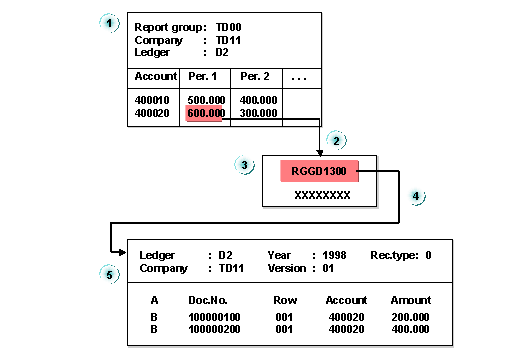
The report in the graphic displays accounts by periods. This report is assigned to report group TD00. Report group TD00 has been defined such that ABAP program RGGD1300 is a receiver report in the report group (on the Create Report Group: Header screen).
Program RGGD1300 is called up with the Report Writer as follows:
You can select part of the displayed report and have the system display the associated line items.
For more information on calling receiver reports, see
 Delete row
 Add external report
 Select line
 Move
Move Default text
 Help
Help