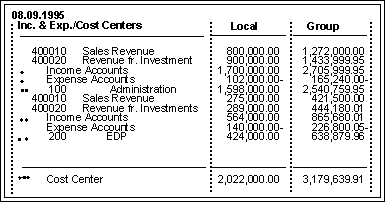
You can suppress individual values, ranges of values, or total set values within a report. Setting the suppression indicator on a multi-dimension, single-dimension, or basic set screen tells the Report Writer to ignore individual amounts and totals at lower levels of set hierarchies.

For columns, the value intervals (ranges) in basic sets are suppressed automatically; only the interval total is displayed.
In a basic set, the value intervals (ranges) are printed as individual amounts. You use the suppression indicator to suppress the individual interval amounts in a set row.

If a basic set line has an interval of account numbers 1000020 to 1000050, the system prints the amounts for all the account numbers from 1000020 to 100050, if data has been posted for these accounts. If you set the suppression indicator in the basic set for this line, the system prints only the total for the account numbers 1000020 to 1000050 instead of the individual amounts.
In single-dimension and multi-dimension sets, you use the suppression indicator to suppress individual amounts for an entire set.
If you set the suppression indicator for the set TD-RACCT-EXP in the multi-dimension set TD-CC-ACCT, the individual amounts of the set TD-RACCT-EXP are suppressed, but the total amount of the set TD-RACCT-EXP is printed.
In the following graphic, the individual totals for the expense accounts are suppressed.