 Introduction to Master Data
Introduction to Master Data
Use
Within the Special Purpose Ledger (FI-SL) System, you can enter master data information for any dimension used by the FI-SL System.
What Is Master Data Maintenance?
The FI-SL System uses master data values that can be found in other applications' databases and in FI-SL tables. Master data contain the valid values for most of the dimensions that are defined in the FI-SL coding block. The location of master data is defined in Customizing during the installation of the FI-SL System. How you define master file location during installation determines where the FI-SL System accesses master data for a dimension.
You do not need to maintain standard dimensions, like Account, Cost Center, Company Code, since master data for these dimensions exist in the standard system. You only enter master data for non-standard dimensions.

For the dimension Profit Center, the system might find master data values in Controlling (CO). If you do not use the SAP CO software, you could set up the FI-SL System so that it finds Profit Center master file values in an FI-SL table.
Overview of Master File Maintenance
You use the FI-SL master file function to create master file values that are not included in the common master files of other applications.
If master file information for the dimension Profit Center does not exist in other SAP applications' master files and the dimension Profit Center is defined in your FI-SL coding block, you can enter master file values for the dimension Profit Center.
In the following graphic, FI-SL master file values are created for the dimension Profit Center for Company Code 1000. Company Code 1000 also uses master file information from the SAP Controlling (CO) and Finance (FI) applications.
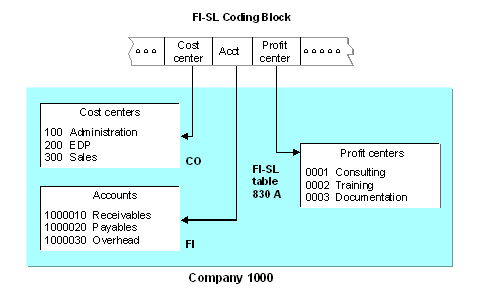
You do not need to add master data for all of the dimensions used by the FI-SL System. If the master data is defined in other databases, you can use the values entered in those master files without entering the values in FI-SL. To determine which master file values are used, the system refers to the conditions defined during installation.

You should only maintain FI-SL master data when (1) you want to add master data only for the FI-SL System (and not other applications), or (2) the master data is not stored by another application in the system.
The system uses master data to provide text for the Report Writer and to find valid values for the FI-SL Allocation and Planning components. The system also uses master data to check if values are valid during FI-SL document entry.
You can define master data at a client level and at a local/global company code level. The system first checks for master data values at the local/global company code level. If the values are not there, the system then checks for master data at the client level. In the FI-SL System, you can define master data for dimensions that are not defined in other applications' master files.
Master data is stored by dimension; therefore, a dimension must exist in the FI-SL coding block before you can enter master data values for the dimension. Also, you can only add master data for dimensions that are defined specifically for FI-SL. For more information about changing the conditions for entering master data (so that you can enter FI-SL master data for a dimension), refer to the Implementation Guide (IMG) for Special Purpose Ledger.
You can also create FI-SL tables with names other than T830X, which contain your FI-SL master data and text. These tables have the same structure as the T830A and T831A tables. For more information about creating FI-SL tables for master data and text, refer to the Implementation Guide (IMG) for Special Purpose Ledger.
In the FI-SL master data, you can enter values for a dimension, as well as language-specific text, which describes each value. These values only update FI-SL tables; they do not update other applications' databases. In most cases, you will not add values for master data that exist in other systems.
The values you set up in the FI-SL master data can be different from the values that are set up in the databases of other applications. The FI-SL System can use both FI-SL master data values and master data values in other applications' databases, but it does not mix the values for a single dimension.
If you execute user-defined user exits to validate a master file value, you can execute these user exits using the CMOD function. This allows you to create and activate user exits without having to modify the master data maintenance program.
You can still use existing exits, but new user exits must be named =Uxx to distinguish them from the previous exits (=xx).
Validating Master File Combinations
An additional function is available for validating combinations of dimensions and dimension values. By choosing Basic Settings
® Master Data ® Maintain Code Combination in Customizing for Special Purpose Ledger, you can maintain the dimensions stored in object tables for FI-SL summary tables so that:When a posting is made to the ledgers that use the table, the system validates the dimension combinations.
Before you can maintain the dimension combinations of an object table, entries must be maintained in Customizing (table T800D) for the individual dimensions of the table. For more information, refer to the Maintain Integrated Master Data activity in the Implementation Guide (IMG) for Special Purpose Ledger.
You must also activate the dimension combinations so that the FI-SL programs can validate them.
Dimension validation is different from the validation/substitution functions. With dimension validations, you can perform simple validations on combinations of dimensions stored in object tables when data is being posted. Validations/substitutions allow you to create complex Boolean formulas for validating/substituting data, according to your individual system setup and requirements.