 FI-SL Master Data: Special Purpose Ledgers
FI-SL Master Data: Special Purpose Ledgers
There are two types of ledgers used in the Special Purpose Ledger component:
Standard Ledgers
Standard Ledger are configured and delivered by SAP and are controlled within the individual applications. These ledgers cannot be edited using FI-SL tools (such as FI-SL’s posting functions) unless the functions are defined for the application of the standard ledger.
Standard ledgers include:
Special Purpose Ledgers
Special purpose ledgers are ledgers defined to meet your specific business requirements, according to the dimensions you define. They contains the dimensions that you specify. This is the only type of ledger you can create in your FI-SL system.

FI-SL databases are sub-divided into separate logical units, or special purpose ledgers. A special purpose ledger is a collection of data in an FI-SL database.

You can create one special purpose ledger that contains cost center-related information and another special purpose ledger that contains product-related information.
Each ledger uses several dimensions that define a sub-set of the coding block of an object table. You can define your system so that you have one ledger for each database table structure, and/or more than one ledger per table structure. After you have defined the maximum coding block in the ABAP Dictionary, you define which dimensions will be used by each ledger.
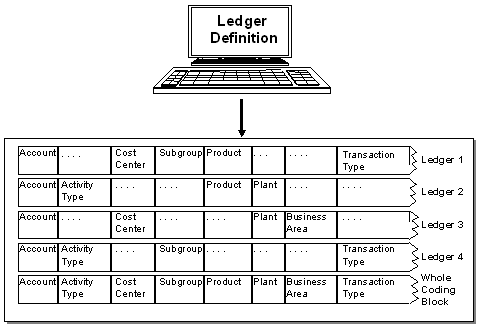

The dimensions that can be used in a special purpose ledger, are determined by the field grouping code assigned to the ledger. The field grouping code contains the dimensions that are taken over from the source database table into the FI-SL database table.
Defining Special Ledgers
When you create a special ledger, you define:
The dimensions used are determined by the field movement that has been defined for the special ledger and the table that is assigned to it.
In the master data information, you can also define how the ledger is posted to, whether data in a ledger can be summarized and whether transaction data can be deleted from the ledger using the source application's reset program.
(for local ledgers) or "ledger/company" (for global ledgers)
You can store three currencies in parallel in an FI-SL table:
You can assign various currency types to your ledgers. When you define a ledger, the system proposed possible currency combinations. When you install your system tables, the system also asks you to enter currency information for the posting (for example which currency a ledger is to be posted to).
Selecting Special Ledgers
If you are working with ledger selection conditions, you can define exactly when the ledger is to be posted to. Using the ledger selection conditions, the FI-SL Integration-Manager (the posting interface) decides which ledger(s) is/are to posted to for a given business transaction.
For each business transaction, the FI-SL tables are updated according to the rules defined by the user.
You can define that a special purpose ledger is booked to when one of the following applies:
-
The business transaction affects a certain account group.-
The business transaction affects a certain product group.-
The business transaction affects a certain group of transaction types.You can define simple and complex ledger selection conditions. Each field value or combination of field values that is affected by a business transaction can be used in the ledger selection conditions. This does not apply for amounts and quantities.
You cannot enter ledger selection conditions for standard ledgers.
For further information on defining ledgers, see the Implementation Guide (IMG) under Special Purpose Ledger è Maintain Ledger.
Use
When creating special ledgers, you can use the following criteria:
Several special purpose ledgers can use the same dimensions defined in a database table.

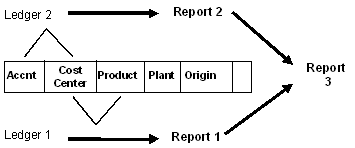
In the above graphic, the database table contains the variable dimensions Account, Cost Center, Product, Plant, and Source.
You want to create two reports:
When you define the special purpose ledger for the reports, you could define one special purpose ledger that uses the dimensions Product, Account, and Cost Center. However, a more efficient use of the database storage might be to define two special purpose ledgers:
When the system selects and stores data records for Report 1 (dimensions Cost Center and Product), it only selects and stores data records for the two dimensions, instead of for all three dimensions (Product, Account, and Cost Center). You could also create a report (Report 3), which is a combination of Special Purpose Ledgers 1 and 2.
The structure you use for your special purpose ledger(s) depends on your specific reporting needs. When determining your ledger’s structure(s), you should remember that every combination of dimensions that a ledger uses results in a new data record in the database.
One large special purpose ledger that contains many of the dimensions of your database table may serve the purpose of many smaller special purpose ledgers. But by using two smaller special purpose ledgers that contain specific dimension combinations, you can reduce the volume of data records in the database. For more information about summarization of data in ledgers, see
 Data Summarization
Each special purpose ledger contains some or all of the dimensions defined in the database table that the special purpose ledger uses. For any particular business transaction, one or more ledgers can be selected for posting.
Depending on the database structures you use, your ledgers are either:
Local Ledgers
You can use local ledgers to store data posted for local company codes.
Global Ledgers
You can use global ledgers to store data posted for:
You can assign a local company code to a local ledger. You can also assign the same local company code to a global company code (which is assigned to a global ledger). When a document for the local company code posts to the system, it posts to the local ledger and to the global ledger.
Naming convention: You cannot use a number as the first character of a special purpose ledger name (for example, 0A, 1R, 27). If your system currently contains special purpose ledgers that are defined with a number as the first character, please contact your SAP consultant for assistance.
Average Balance Ledger
You can also create an average balance ledger, based on the summary data stored in a special purpose ledger. The average balance ledger automatically inherits the attributes (such as the fiscal year variant, the assigned table, and so on) of the special purpose ledger to which it is assigned. You can only use this ledger when creating reports using the average balance ledger or displaying summary records from the ledger. It is also possible to create a user exit for posting to this ledger, in the case where the posting date should not be used to determine the average balance.
Multiple Special Purpose Ledgers
In the FI-SL System you can summarize different kinds of business transactions into different special purpose ledgers, or have many business transactions update many different ledgers. You can also define if a special purpose ledger is mandatory for all business transactions.
In the following graphic, the same document posts to more than one special purpose ledger, but with different information.
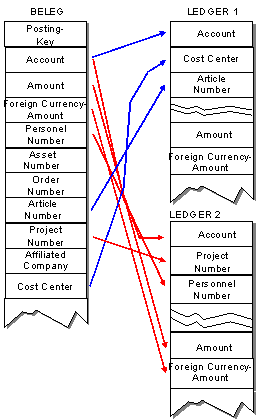
When you define a special purpose ledger, you assign one or more companies to the ledger. When a transaction is entered for a company code, the system posts the transaction to the assigned ledgers.
You can also create multiple special purpose ledgers according to your financial needs. You do this by specifying which dimensions the special purpose ledger should use.
You may need several special purpose ledgers if you:
Parallel Posting of Ledgers
You can define which business transactions and dimensions flow into a special purpose ledger, and you can specify if a special purpose ledger is mandatory for a business transaction. You can also summarize different kinds of business transactions into a special purpose ledger, or post one business transaction to many different special purpose ledgers.
If a ledger selection condition is met for more than one special purpose ledger for one business transaction, the business transaction will be posted to more than one special purpose ledger.