
Your Bank Details
To be able to run the payment program, the system requires details on your own bank, and these details must be entered in the customer and vendor master records. In the company code-specific data of a vendor master record, you could for example enter the house bank from which payment is to be made to this vendor. If you do not enter a bank in the master record, you must specify the rules by which the payment program determines the bank. The data that you enter is the same in both cases - an ID code for your bank.
Defining your own bank details
You define your bank details per company code by entering a three figure code for each bank. You can enter a five figure alphanumeric key as a bank ID. You could for example store the bank details for the People's Bank, Denver as "PEOPD".
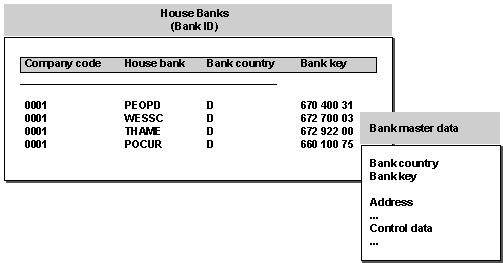
Each bank ID is unique within a company code. For each bank, enter the bank country, and either the bank number or an appropriate country-specific key. The system uses this information to identify the correct bank master data.
When you define details for the payment program (this necessitates entering the bank master data for your bank details) you need enter only the bank ID.
Defining bank accounts
In addition to the bank details, you must also define the bank accounts that you have at your bank. You define these under an account ID which is unique per company code and house bank.
This account ID can incorporate attributes of the bank account, and you are advised to choose an ID that reveals as much information about the account as possible. You will use this ID to be able to refer to your bank account both when entering specifications for the payment program, and in G/L account master records.


In the above graphic, the account ID DEM was used for a current account managed in German Marks. For a current account in domestic currency, GIRO and CURR and PCUR were used.
The account data you enter comprises the account number at your bank, the currency in which the account is managed, and any additional country-specific data. To assist, the system displays bank master data on the entry screen.
G/L accounts for your bank accounts
For each of your bank accounts, you must define a G/L account in the system.
In the G/L account master record, enter a currency key (this must correspond to the currency in which the bank account is managed). If, for example, you manage a foreign exchange account in German Marks at your bank, you must enter the currency key for this currency in the G/L account master record.