
Overview
SAP Portfolio Graphics generates graphs of portfolio representations. These graphs can display business relationships (for example, a comparison of product lines): you can depict objects in relative sizes, their growth trends, and so on. To show such relationships, SAP Portfolio Graphics lets you specify objects for display, their sizes and positions in the graph, connections between objects, graph quadrants, and so on. The online user can the browse and zoom the graph, format it with display options, modify numerical values, and so on.
The SAP Portfolio Graphics display looks as shown in the following figure.
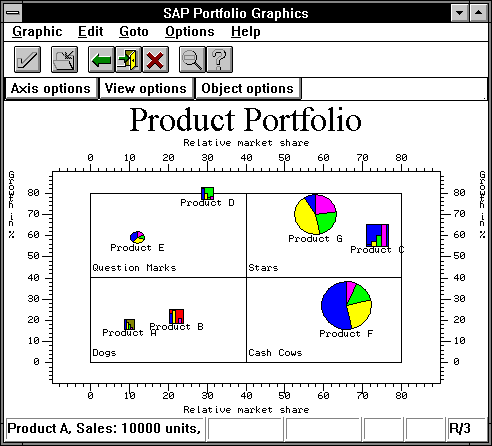
You can call SAP Portfolio Graphics from an ABAP program, and generate a portfolio display at the user's workstation terminal. Your program provides the graphical data and calls the SAP Portfolio Graphics function module:
Programming Interactive Applications
An ABAP program that allows the online user to open multiple windows or enter data with the mouse or keyboard is interactive. When you use GRAPH_PORT, your application is always interactive, since SAP Portfolio always reports user-clicks (selections) back to the ABAP program.
You are provided with two mechanisms for controlling the interaction between ABAP program and online user:
Using graphics function modules with dialog parameters STAT, M_TYP, PWDID, SUPER, WINID and RWNID)
Using graphics function modules with dialog parameters STAT, PWDID, SUPER, and WINID)
plus utility function modules :
For new programs, you should use only the second mechanism, graphics function modules with the utility function modules.

Do not use both mechanisms together in a program.
For more information, see
Programming Interactive Applications.You can also also change the standard graphics display and define additional graphics functions for interactive users. This means when you call up SAP Portfolio Graphics, it appears with changed or extra menu names or pushbuttons.
For more information, see the section
Changing the Standard Graphics Display. To define these additional functions, call the appropriate function module before you call an SAP Portfolio Graphics function module.If your ABAP program calls GRAPH_ACTION, it must also use the CUA_ID and P_TYP parameters (when calling GRAPH_PORT) in order to learn when the user has selected these additional functions.