 Overview
Overview
The SAP Network Graphics function modules let you generate graphs of network or hierarchy structures.
Networks structures contain nodes (with links between the nodes), clusters of nodes, and other objects.
Networks structures have properties (attibutes) at all different levels. Nodes, for example, can have colors, fields with text labels, numerical values, and so on. Lines can have colors and fields, while clusters can have colors.
A typical SAP Network Graphics display looks as shown in the following figure.
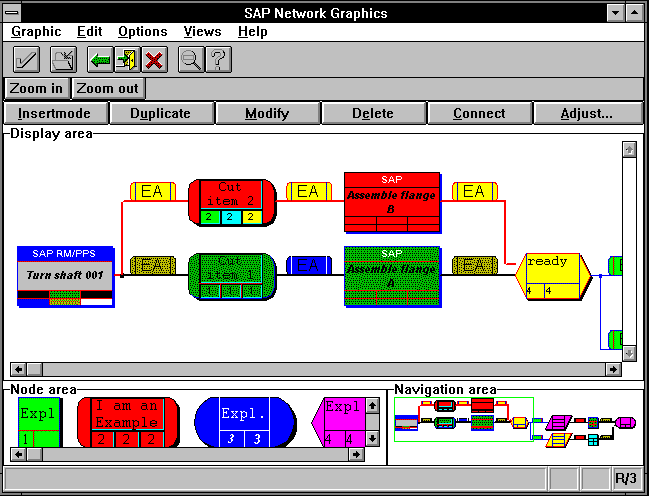
You can call SAP Network Graphics from an ABAP program, and generate a graphical representation at the user's workstation terminal.
The following function modules call up SAP Network Graphics on the user's workstation, display the data there, and report some user actions back to the your ABAP program.
This function module is for displaying all networks.
This function module is specialized for displaying hierarchies. However, you can represent hierarchies with CNET_GRAPHIC_NETWORK, if desired.
This function module calls the Cluster Editor.
The Cluster Editor contains groups of boxes with frames around them. You can specify text to appear in the boxes. The online user can move boxes within a frame.
You can customize your graphics application using a profile (see parameter PROFILE) to be defined in the R/3 Customizing facility.
Reporting Back User Actions
Each of the above function modules provides interactive capabilities. If your ABAP program allows the online user to open multiple windows or enter data with the mouse or keyboard, the application is interactive. In confirm-firm mode, the graphics program notifies the ABAP program every time the user attempts certain actions.
For more information on interactive applications, see
Offering Interactive Capabilities.Changing or Adding CUA Items
You can customize the SAP Network Graphics window by changing or removing existing CUA items (menu names or pushbuttons) or defining additional graphics functions.
To add functions or rename menu names, you must call the appropriate function module. For more information, see the section
Changing the Standard Graphics Display.)Networks and Hierarchies
Networks are structures of nodes connected by lines. A given node can have any number of predecessor nodes and successor nodes. Predecessor nodes are neighbors linked directly to the given node, from the left side. Successor nodes are neighbors linked directly to the given node, from the right side.
Hierarchy structures are special cases of networks. In a hierarchy, each node can have any number of successor nodes, but only a single number of predecessor nodes. Hierarchies are usually pictured in a top to bottom fashion ("downward branching"), so that the predecessor lies above a given node, and the children lie beneath. With hierarchies, predecessors and successors are often called "parent" and "child" nodes.