 G/L Account Posting - Enjoy Transaction
G/L Account Posting - Enjoy Transaction
Use
You can use this function to enter G/L account postings. The Enjoy G/L account posting is a single-screen transaction. This means that you can enter, hold, park, and post documents on one screen with a minimum amount of entries.
Integration
You can use the G/L account posting Enjoy transaction as well as the standard transaction. To access the G/L account posting standard transaction, from the SAP Easy Access screen, choose Accounting ® Financial accounting ® General ledger ® Document entry ® Other ® General posting.
For more complex postings, for example, a G/L account posting with manual entry of tax items, you can branch directly to the Complex posting transaction (standard transaction) from the single screen transaction. The data that you have entered is transferred. To do this, choose Environment ® Complex posting.

If you change back to the single screen transaction from the complex posting transaction, the data that you have already entered is lost.
Prerequisites
You have made the following settings in Customizing for Financial Accounting under General Ledger Accounting ® Business Transactions ® G/L Account Posting ® G/L Account Posting - Enjoy:
 Define Document Types for Enjoy Transaction
Define Posting Key for G/L Account Posting
Define Document Types for Enjoy Transaction
Define Posting Key for G/L Account Posting
Features
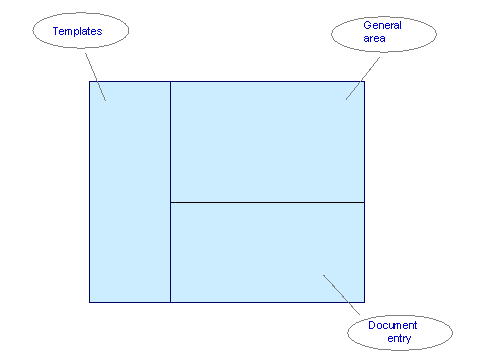
General Area
The following functions are available from the tabs:
Here you can enter the general document data. Select  Editing options to adapt the document processing to your individual requirements. See
Editing Options - Enjoy Transactions
On this tab, you make entries in additional fields for the G/L account item, such as Partner business area or Exchange rate. To have the system calculate tax automatically, select the field Calculate tax.
To change the company code, choose  Change leading company code. The transaction is then restarted with the new company code.
Data that has not been saved is lost.
The light next to the tabs reflects the document balance in the document currency:
 Balance does not equal zero
 Unchecked status (initial status)
 Balance is zero
Document Entry
For information about how to enter documents, see
Entering G/L Account Documents - Enjoy Transaction For more information about the options available for entering document items, see Editing Line Items - Enjoy TransactionAfter you have entered the document, you can carry out any of the following functions:
 Simulate: A document overview appears in which you can select various options for data preparation.
  Hold: Document entry is interrupted, and you can continue at a later point in time. If you have entered a document long text or item long text for a document, this text is lost if you hold the document.
 Park: See Post: See
 Templates
You can select standard templates such as screen variants or account assignment templates from the tree, or define your own. In addition, you can carry out further processing for held documents.
You can display or suppress the tree via  Tree on/off.
There are three options for selecting screen variants, account assignment templates, or held documents:
Select the required object and double-click it.
Select the required object, call up the context menu with the right mouse button, and select the object.
Choose Edit ® Select Screen variant/account assignment template/held document.
Creating Screen Variants and Account Assignment Templates
You can set the document entry area to meet your individual requirements and then save it as a screen variant. In addition, you can save frequently occurring G/L account assignments with default values as account assignment templates. Screen variants and account assignment templates are then available in the tree.
See
Creating Screen Variants - Enjoy TransactionThe following options are available for deleting account assignment templates:

You cannot edit existing account assignment models, held documents, sample documents, or parked documents from the standard transaction with the Enjoy transaction. Instead, you should use the existing transactions for
Recurring Entries,
Posting with Reference Documents, and
Posting Parked Documents
Activities
Entering G/L Account Documents - Enjoy Transaction