 Sending Transfer Orders
The following overview is a schematic representation of the transmission procedure.
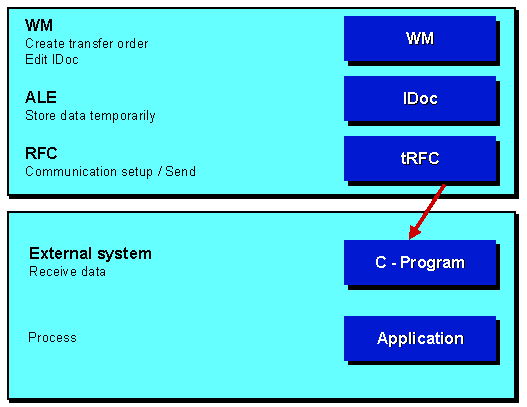
Generating a Transfer Order in the WM System
Transfer orders are generated in a number of different ways in the WM system. This can be carried out manually, automatically (follow-up processing) or by means of multiple processing.
An important question that must be answered at this point is whether or not a transfer order is relevant for an external system. This can be defined on an individual basis in the Implementation Guide ’Link to external system via ALE’. A transfer order item can be activated for this interface and the recipient of this goods movement defined for a storage type or a specific movement type within a warehouse number.
Table: interface control
WhN |
SrcTyp |
DestTyp |
MTy |
CrNo |
Inact |
Rec.system |
Variant |
001 |
*** |
HRS |
EXT. SYSTEM |
||||
001 |
HRS |
*** |
EXT. SYSTEM |
All transfer order items, i.e. all goods movements for the storage type HRS would be reported in the example. The data of the transfer order is formatted in the WM system and passed on internally to a function module of ALE in the appropriate IDoc format.
Buffering Data
The data is formatted as repository (data dictionary) structures by the function module of the ALE layer within the same logical unit of work (LUW) process. These structures are called IDocs (intermediate documents). The generated IDocs are stored in the database.
Refer to
Description of the IDocs for details on defining an IDoc and the structure of the various IDocs.Communication and Transmission
Transmission of the IDoc is initiated by ALE asynchronously to the generation of the transfer order and the IDoc, i.e. after the IDoc has been generated. An IDoc can be sent directly or added to a package of IDocs and then sent after a delay.
The IDocs are sent by ALE using remote function calls. On the external system a Remote Shell is started which itself starts a C-program. The C-program gets as a program parameter the name of the function module which is to be executed. The technique which enables the transmission procedure to be executed correctly in accordance with the protocol is visualized on the surface as an RFC layer. On the program side, a complete library of C programs is available for processing purposes which are, however, hidden from the user.
Details regarding the generation of C programs and the system settings for the connection can be found later on in the technical documentation.
Tasks Performed by the External System
On the external system there has to exist the receiving C-program. A sample program is available here. This is supported by the RFC library which can be obtained from SAP.
The program itself must buffer the data after it has been received before confirmation of receipt is sent to R/3. The data can then be processed. We recommend that the data be buffered so that communication can take place independently of the processing logic in the external system too.
The external system should also incorporate a status management function for the received data in order to prevent the data from being processed twice. It is also necessary to be able to determine, on the external system side, whether an IDoc has already been sent once by the R/3 system. This is made possible by means of a unique transaction ID for each communication process (refer also to the technical documentation for the RFC). In addition to the transaction ID, an IDoc number can be used to determine whether an IDoc has been transferred twice. The IDoc number is only unique in a client of an SAP system. If communication takes place with several clients or several SAP systems, it is not possible to determine whether the IDoc is unique on the basis of the IDoc number alone.
Error Handling
The following problems may be encountered when an IDoc is being transmitted:
Posting procedure aborted in the application (e.g. when a TO is generated)
This is not of interest from the point of view of communication since it is not possible to generate an IDoc without a transfer order. Both postings are made in the same LUW and are thus executed synchronously.
Error in the ALE layer
No connection
If an IDoc has been generated but the connection cannot be set up, a continuous report in the batch processor ensures that communication is initiated sporadically. Pending IDocs are sent automatically if the connection is then re-established.