 Time of Transfer
Time of Transfer
The transfer date is the cut-off date for the transfer of legacy data. The transfer will only include data up to this point in time. There are two possibilities:
You specify the time of the transfer per company code by setting the transfer date (in Customizing of Asset Accounting, choose Asset Data Transfer ® Parameters for Data Transfer ® Date Specifications ®
 Specify Transfer Date/Last Closed Fiscal Year.
Remember that the transfer date generally is not the same as the date for the actual transfer of data. Normally, you create (input) legacy data in the R/3 System after the transfer date. This could be necessary, for example, if you have to perform a closing in your legacy system between the transfer date and the date of the actual transfer. The consequences of the this difference will be explained later in more detail.

You can also transfer legacy data to the R/3 System before the transfer date. However, you then have to make sure that the transactions that you posted in your legacy system up until the transfer date are also later posted in the R/3 Asset Accounting component.
The Transfer Date is the End of the Last Closed Fiscal Year
In this case, you do not need to include any posted depreciation or transactions in the transfer of legacy data. You only need to transfer master data and the cumulative values as of the end of the last closed fiscal year. (In the graphic below, this is the data for time period A). The transfer of balances for the G/L accounts should also use the balances from this date.
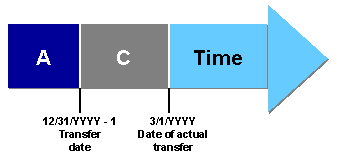
Transfer at End of Fiscal Year
Any transactions to legacy asset data that have a value date after the transfer date, but before the date of the actual transfer of data (time period C), have to be posted in the SAP R/3 System after the legacy data transfer.
The Transfer Date is in the Fiscal Year Directly Following the Last Closed Fiscal Year (Transfer During the Fiscal Year)
In the case of a transfer during the fiscal year, all the business transactions up to the date of transfer have been carried out in the legacy system.
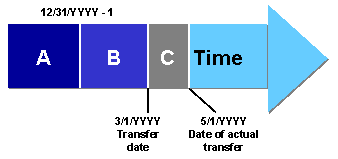
Transfer During the Fiscal Year
Along with the general master data, and the cumulative values from the start of the fiscal year (time period A), you must also transfer the following values:
Include the depreciation posted in the legacy system since the end of the last closed fiscal year up to the date of transfer (time period B). To assist in this procedure, you enter the last period before the transfer date that was posted in your legacy system. You enter this information for each company code and depreciation area in Customizing for Asset Accounting. Choose
Specify Last Period Posted in Prv.System (Transf.During FY) . The system requires this information in order to determine the first period that should be posted in the R/3 System.If you do not want to transfer depreciation posted from your legacy system, you have an alternative. After the legacy data transfer, you can "catch up" the posting of depreciation by carrying out an unplanned depreciation posting run. This posting run will "catch up" all depreciation in the current fiscal year up to the date of the transfer. The system posts all depreciation that the Asset Accounting component determines for this time period.
When transferring legacy data during the fiscal year, you also have to include the transactions from the end of the last closed fiscal year up to the date of transfer (time period B). There are two ways of doing this:
You should be aware, however, that entering these transactions does not result in any updating of General Ledger accounts. When transferring the balances of the G/L accounts, therefore, you need to transfer the balances as they stand on the date of transfer (in Customizing for Asset Accounting, choose Preparing for Production Startup ®
Transfer Balances).
Any asset transactions in your legacy system that have a value date after the transfer date, but before the date of the physical transfer of data (time period C), need to be posted separately in the Asset Accounting component of the R/3 System in any case.

The following values have to be entered in the transfer transaction in Asset Accounting:
In addition you need the following data

You can only transfer acquisitions and down payments to the R/3 System using automatic transfer. You have to enter other kinds of transactions (such as retirements) using the manual transfer transaction.