 Posting Depreciation
Posting Depreciation
Use
Every asset transaction in the R/3 System FI-AA component immediately causes a change of the forecasted depreciation. However, it does not immediately cause an update of the depreciation and value adjustment accounts for the balance sheet and profit and loss statements. The planned depreciation is posted to the general ledger when you run the periodic depreciation posting run. This posting run uses a batch input session to post the planned depreciation for each posting level for each individual asset as a lump sum amount.
When the system posts depreciation, it creates collective documents. It does not create separate documents for each asset.
Features
You can choose both the posting cycle and the additional account assignment levels (such as, cost center, order - see
Additional Account Assignment) for the depreciation posting run per company code and depreciation area. This specification is made in FI-AA Customizing: Specify intervals/account assignment rules.The following graphic shows the posting of periodic depreciation in account form. You can enter the accounts shown in the account determination in each depreciation area (see
Account Determination).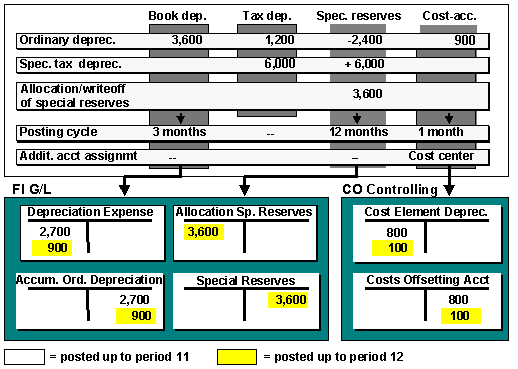
Depreciation Posting
Posting depreciation to the corresponding G/L accounts takes place using a batch input procedure. For more information, see
Depreciation.Performance
It is difficult to provide precise information on performance, since it is strongly dependent on your system configuration. However, you can use the figures below for a rough estimate:
Since only collective documents are created, the number of documents to be posted per depreciation posting run depends on the number of general ledger accounts to be posted, and even more so on the number of cost centers to be posted.
For more information on improving performance, see
System Performance Improvements.
Creating a batch input session for posting depreciation can only be carried out as background processing.