 Assignment to Cost Center and Profit Center
Assignment to Cost Center and Profit Center
Use
For internal accounting, you generally need to assign asset costs to cost centers. Therefore, you can assign each asset in Asset Accounting to exactly one cost center. You make this assignment in the asset master record. At the level of the cost center, you can then
Prerequisites
If you want to use cost accounting across company codes, then you have to set this up in Customizing for Asset Accounting. Choose Master Data ®
 Specify Cost Center Check Across Company Codes.
You define the necessary clearing accounts for this for the different company codes in Customizing for General Ledger Accounting. Choose Business Transactions.
Features
The cost center assignment of a fixed asset can be set to begin on a specific day. If this date changes over the course of time, the system distributes depreciation and interest, according to the appropriate period, to the different cost centers, whereby costs are always allocated to the cost center valid at the end of the depreciation period. The history of the cost center changes can be managed in the system as long as you wish. A cost center can also be assigned to a business area as an asset can. In asset master record maintenance, therefore, the system ensures that the business area of the cost center matches the business area of the asset.
Assets can be assigned to profit centers indirectly, by means of the cost center. In this way, account assignment to profit center is possible for asset business transactions that affect net income. For more information, see the documentation for the R/3 Profit Center Accounting (EC-PCA) component. Special rules apply to changes to cost center assignment, if this change affects the profit center assignment of the asset. When this is the case, certain preconditions have to be met. For more information, refer to
Changes to Master Data
If you assign assets to more than one cost center at the same time, you have to do one of the following:
For more information, see
Cost Accounting across Company Codes
Cost accounting in the SAP R/3 System can be organized both within one company code and across company codes. Cross-company code cost accounting allows you to assign a cost center to an asset when the company code of the cost center is not the same as that of the asset. Before you do this, you have to allow this procedure in Customizing (under Master Data). The system then makes additional account assignment of depreciation and interest to this cost center (that is in a different company code than the asset). The system posts the debits using the cost element that is entered as depreciation expense account in the FI-AA account determination. This type of posting is possible since all of the company codes belonging to a controlling area have to use the same chart of accounts.
The rest of the posting procedure depends on whether the account assignment to cost center takes place in the book depreciation area or in the cost-accounting area:
When you set up the system in this way, it is not possible to post revenue/expense from asset transactions (such as gain or loss from asset sales) from the book depreciation area to cost centers.
The following graphic shows an overview of these postings:
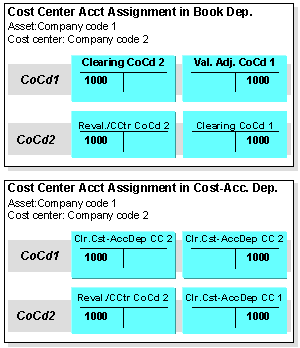
Cost Accounting across Company Codes
You specify all of these accounts (except for the company code clearing accounts) in Customizing for Asset Accounting.