 Restatement Options using Drilldown Reporting
Restatement Options using Drilldown Reporting
Use
You use this function, for example, to list the figures of past fiscal years the current
premises (for example, the corporate structure) after corporate rebuilding or after shifting to a different accounting standard (for example from German HGB to IAS or US GAAP).Prerequisites
You have already created a report using interactive drilldown and want it to be, for example, based on a modified consolidation group hierarchy.
Features
Restatements permit "what-if" analyses with the following content:
Here, the reference version of a report determines which (version-dependent) composition of consolidation units in a consolidation group is to be used for the selection of transaction data.
If the attributes of the organizational units are version and date sensitive, the reference version is also the version for which the attributes of the organizational unit are determined.
With a version-based restatement you can compare the data of different consolidation versions.
Here, the reference period and reference fiscal year of a report determines which (date-dependent) composition of consolidation units in a consolidation group is to be used for the selection of transaction data.
If the attributes of the organizational units are version and date sensitive, the reference period and reference fiscal year are also the period and fiscal year for which the attributes of the organizational unit are determined.
With a temporal restatement you can compare the data of different periods or years.
You can use these "what-if" analyses to portray how a changed composition of a consolidation group can affect the group's earnings. This can be useful to show the results of an addition or divestiture of a certain consolidation unit.
The following illustration shows the display options for a changed hierarchy:
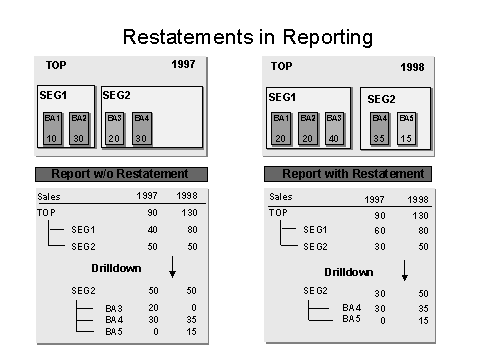
Note that in the illustrated Reports without and with Restatement the change in the composition of business areas takes effect at different dates.
 This technique can be used to portray the corporate group as if it had existed in 1997 in the constellation of 1998. This can be used, for instance, to ensure a high comparability of the consolidated statements of several fiscal years in a often-changing consolidation group.
The
reference fiscal year relevant in this case is the one that reporting uses as the base for the reference characteristic when drilling down the consolidation group into consolidation units. The selection of transaction data uses the reference fiscal year to determine the (date-dependent) composition of consolidation units in a consolidation group.If the reference fiscal year is not specified, the characteristic fiscal year is used instead of the reference fiscal year for drilling the hierarchy and determining the attributes. This is the case with the report without restatement.
The report with restatement uses the same fiscal year for both columns in a hierarchy drilldown; therefore, you can also use the characteristic consolidation unit for breakdowns and hierarchy drilldowns. However, this is only possible if the consolidation unit in question is included using the purchase method or proportional consolidation in only one consolidation group.
Limitations of Restatements
Restatements are not possible when dealing with group-dependent postings that reflect very complex business transactions. For example, this is the case with postings for the consolidation of investments.
Restatement Options up to and Including Release 4.5
Reference characteristics are not available in Release 4.5 and earlier.
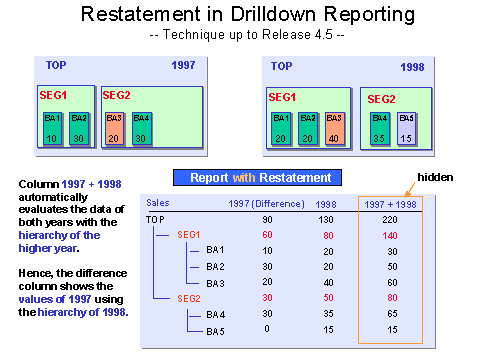
The following illustration shows the available restatement options in SAP systems with Release 4.5 and earlier. A means of simulating the hierarchy of the year 1998 is achieved by creating the total of the amounts of both fiscal years at a given FS item (in a hidden column) and showing the "old" fiscal year 1997 as the difference between the total of both years (1997 and 1998) and the amount of fiscal year 1998.
Activities
Create your reports with reference versions to state additional information about the influence of individual consolidation
units and consolidation groups as well as its history. Do this as follows:The screen Execute Drilldown Report: Selection appears.
The screen Report Painter: Create Form appears.
Define two columns. Confine the selection of data to the version. Define local variables 1 and 2 for each version. Create a local variable for the reference version in the general selection area. Save the form and create the report.
The general drilldown documentation contains all further information for creating and using forms: see
 Form.
Form.
dimension, consolidation group, version, fiscal year, period
 .
.The drilldown report is executed. The output is shown in the fashion you select beforehand (for example, as a classic drilldown report).
again. At this point, you should copy the definition of the initial report to a new report, so you only need to enter the parameters that are to be changed for the additional version.
Result
You have three versions of your report: the two reports you created utilizing the columns, and the reference version. Specify that one of the two versions you created is to serve as the reference version.