Reporting with Interactive Excel
Reporting with Interactive Excel
Purpose
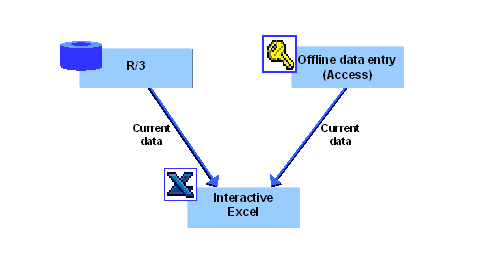
This component enables you to evaluate current data from a SAP System or Microsoft Access database in user-defined reports, as shown in the following graphic:
Implementation Considerations
You can use Interactive Excel to create reports on data from the following sources:
Features
Interactive Excel enables you to evaluate data in the following report types:
– Data matrices
– Pivot tables
– Additions to reports, for example charts
In a report, you evaluate financial data for various characteristics and combinations of characteristics. In order to simplify definition of a report, you can use lists of proposals for the characteristics predefined in Interactive Excel by accessing master data and control parameters that exist in a SAP System or Microsoft Access database. However, you are also free to define your own report or part of a report without using values from Access, and to apply any formatting that you require.
Interactive Excel is added on to the standard Microsoft Excel application in the form of a template. It therefore has the advantage of being based on a well-known spreadsheet program that offers a wide range of formatting functions.
Current data can be imported from a database into a report for the purpose of evaluation. Data imported from the SAP System originates from the Consolidation totals table.
A live link to the relevant database enables report data to be automatically refreshed after any changes in the report definition (for example a change in the fiscal year). You also have the option of triggering a refresh at any time, in order to overwrite data in a report with the up-to-the-minute data from the database.
If you already created a pivot table for reporting on the data processed in Interactive Excel, you can refresh the data for the pivot table without having to creating an entirely new pivot table. To do this, go to Interactive Excel and choose Consolidation ® Pivot table ® Refresh.
With this feature, you can flexibly create and adapt your reports to meet your changing demands.