Data Transfer Process of RA Master Data

Data Transfer Process of RA Master Data
Purpose
Automatic transfer of rental agreement master data from another system to the R/3 System using direct input.
Process
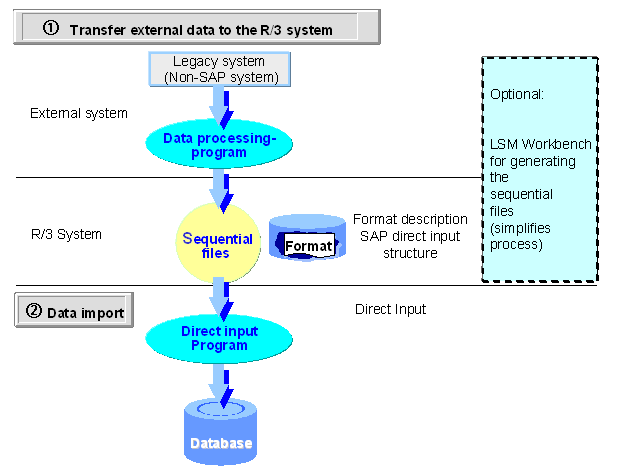
The data transfer file (flat file/sequential file) contains the data from the old system in a certain format that is an
SAP-compatible format. This is a prerequisite for a successful data transfer. The principle of data transfer in the R/3 System can be seen from the following diagram:Rental agreement master data is transferred in the following steps:
 Identify the relevant fields
The screens in the R/3 System are transaction-specific and process-specific. This means that the status of a field is influenced by certain factors and data combinations as well as being influenced by certain functions. A field can have the following statuses:
Check the data extraction from the legacy system and which fields have to be filled by executing the SAP transaction for the rental agreement.
Analyse transfer structure
The rental agreement has the following transfer structures which define the possible fields:
Example: Create Sample Data Transfer File (test data transfer)
SAP recommends that you
Write and test conversion program
Extract the data that you have to transfer into the R/3 System by using a customer-specific program. Write the data in the required order into the sequential file. Before you extract the data, you should be familiar with the control parameters of the rental agreement master data maintenance.
You place the SAP-specific data such as transaction codes in the sequential file as well as the data to be transferred. To generate the sequential file for the direct input process, you have to compare the SAP system structure with the structure of your old system. You might have to add to your data or change the format/length of the field contents.
Create master data with the rental agreement transactions and generate a sequential file from it. In this way, you can clearly see with what values the fields have to be filled.
The user who starts the data transfer must be authorized for rental agreement master data authorization. These authorizations are checked during data import.
The system makes the same checks during automatic data transfer as it does during manual data entry. The same error messages and warnings are issued; data is posted in the same way and updated in the database. If an error occurs during import, an error log is written.
This error file can be processed and read any number of times until all errors have been rectified.

You can find all relevant transactions for the rental agreement master data transfer in Customizing for Real Estate with the relevant documentation: R/3 Real Estate ® Production Startup Preparation.
Result
Rental agreement master data is transferred to the R/3 system.