 Effects of the Link at Batch Valuation
Effects of the Link at Batch Valuation
Integration
The link between master inspection characteristics and class characteristics allows you to transfer results of a quality inspection to the batch classification, so that the system can access them in batch determination. This can only take place, if the material is to be handled in batches and if a batch class was assigned to the material master in the classification view.
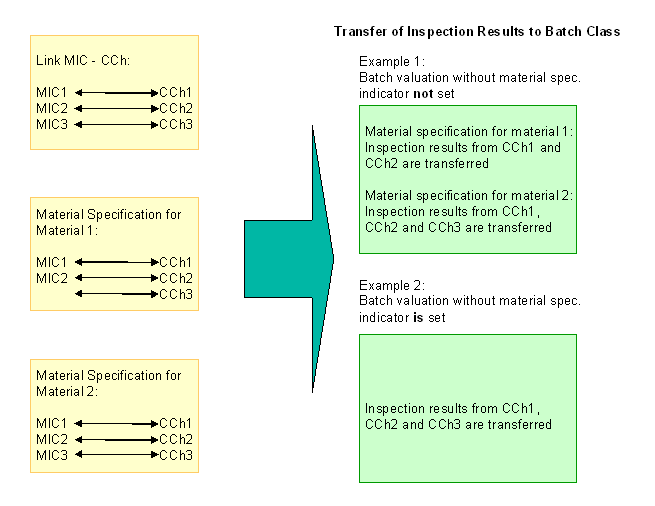
The processes shown in yellow take place in the Quality Management application component; those shown in green take place at inspection lot creation.
Process Flow
Example 1
 Customizing at plant level, you do not set the Batch valuation without material spec. indicator.
Master Inspection Characteristic |
Class Characteristic |
MIC1 |
CCh1 |
MIC2 |
CCh2 |
MIC3 |
CCh3 |
Class Characteristic |
Assigned Master Inspection Characteristic |
CCh1 |
MIC1 |
CCh2 |
MIC2 |
CCh3 |
Class Characteristic |
Assigned Master Inspection Characteristic |
CCh1 |
MIC1 |
CCh2 |
MIC2 |
CCh3 |
MIC3 |
Example 2
Master Inspection Characteristic |
Class Characteristic |
MIC1 |
CCh1 |
MIC2 |
CCh2 |
MIC3 |
CCh3 |
Result
Example 1
If you inspect with material specification 1, the inspection results from characteristics 1 and 2 are transferred to the batch classification and are used in batch determination. The inspection specifications are copied from the classification.
If you inspect with material specification 2, the inspection results from characteristics 1, 2 and 3 are transferred to the batch classification and are used in batch determination. The inspection specifications are copied from the classification.
Example 2
In the inspection, the inspection results from characteristics 1, 2 and 3 are transferred to the batch classification and are used in batch determination.