 Monitoring Multiple R/3 Systems
Monitoring Multiple R/3 Systems
Use
By default, the alert monitor watches over the R/3 System in which you start it.
However, you can monitor multiple R/3 Systems from a single alert monitor. For example, you can make one R/3 System your central system for monitoring. You then simply add your other R/3 Systems to the alert monitor in this central monitoring system.
You can monitor as many R/3 Systems from a single system as you require. Technical factors, such as the speed of and the amount of traffic on your network limit the number of systems that can be monitored. Experience suggests that such practical limits become meaningful only when monitoring multiple tens of R/3 Systems.
Prerequisites
You can only monitor a remote RFC system once you have defined an RFC destination for each R/3 System that you wish to monitor remotely. A remote R/3 System is any R/3 System other than the one in which you are logged on.
Define an RFC destination for a remote R/3 System by calling Transaction SM59. The procedure for defining an RFC destination is described below.
Procedures
Monitoring an Additional R/3 System
Target system: Enter the name of the R/3 System that is to be monitored. Examples: C11, R3P.
Target system RFC destination: Enter the name of the RFC connection to the remote R/3 System. Choose Goto ® RFC connections to display a list of the connections that have been defined. To define a new connection, see the procedure below.
What should be monitored?: Select The whole R/3 System.

If you have already set up your own rule-based monitors, then the new system will be automatically added to your monitors.
Defining an RFC Connection to a Remote R/3 System
Before you can monitor a remote R/3 System, you must define an RFC connection to the remote system as follows:
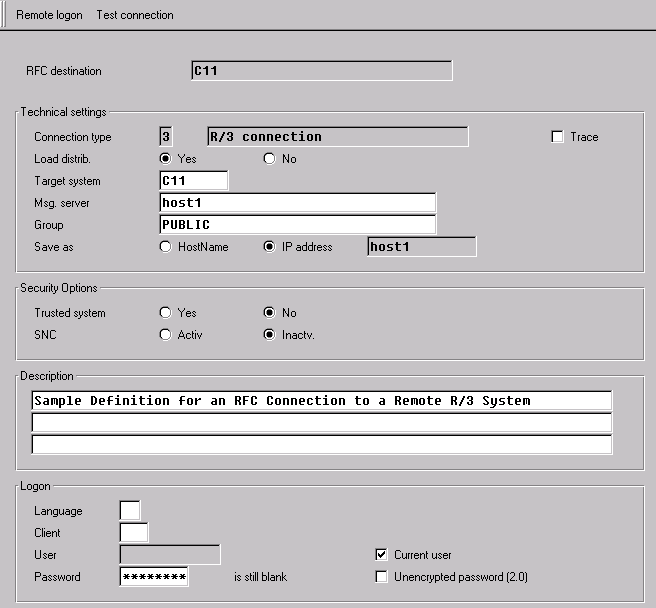
RFC destination: A freely selectable name for the RFC connection that you are defining.
Connection type: Enter 3, for R/3 System.
Description: Identifying text.
In the Logon group box, either mark Current user, or enter the user specifications for a user in the destination R/3 System. The RFC connection logs on with this user to the remote system. Whether you use the current user or a specific user, this user must have authorization for the alert monitor and for system administration in the target system.
Target system ID: Enter the R/3 System ID (C11, for example).
Target host: Enter the host name of the message server. If you are not sure of it, then log onto the target system and call Transaction RZ03. The message server is the R/3 instance with the M in the Services column. The host name is the first part of the R/3 instance name: host1_C11_01.
Group: Enter the logon group to use on the target system. If you are not sure, enter Transaction SMLG on the target system to display the available groups.
Save as: Select IP address. The message server host name or IP address is automatically entered in the adjacent field.
Here is a sample definition screen:
For more information,
see:
 Maintaining Remote Destinations.
Result
You can monitor multiple R/3 Systems in the alert monitor on a single R/3 System.