 Approving and Following Up an Appraisal (PA-PD)
Approving and Following Up an Appraisal (PA-PD)
Purpose
This workflow describes the procedure for approving and following up an appraisal.
Once an appraiser has held and completed an appraisal, it can be sent to the appraisee for approval. The appraisee can display the appraisal, and opt to approve or reject it. If the appraisee decides to reject the appraisal, the appraiser can then review the appraisal. Once the appraisal has been approved, various follow-up activities can be performed.

You must use this workflow if you wish to perform the follow-up activities defined for the appraisal model. You can also set up the workflow so that it omits the approval process.
You use this workflow if, for example, you want to:
Process Flow
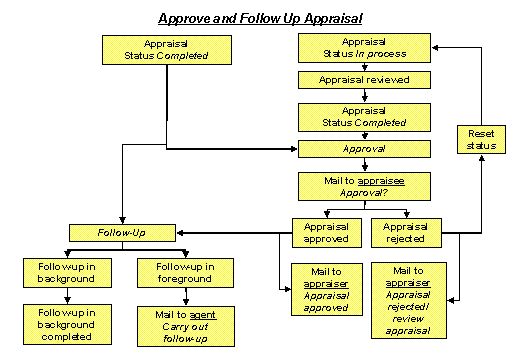
Appraisal approved |
Appraisal rejected |
|
An appraisal can be rejected several times. This step is not complete until the appraisal has been approved. |
Follow up in background |
Follow up in foreground |
This runs automatically, and cannot be canceled. No correspondence is triggered. |
In this case, a suitable agent is determined – this agent is informed of this task by e-mail. The agent can carry out or cancel the follow-up activities. |
Result
The workflow is completed.
For more information on defining the workflow, refer to
Details of Workflow Definition.