 Transfer Variant
Transfer Variant
Definition
In the transfer variant, you specify the transfer method and transaction types for use in intercompany asset transfers. You make these specifications based both on the relationship (are they part of the same legal entity, or legally independent entities?) between the company codes involved, as well as the cross-company depreciation areas concerned.
Prerequisites
The transfer variants supplied by SAP cover most intercompany transfers. If you need additional transfer variants, you create them in Customizing for Asset Accounting. Choose Transactions Õ Intercompany Asset Transfers Õ Automatic Intercompany Asset Transfers Õ Define Transfer Variants.

Definition of the Transfer Variant
Use
In the standard system, the system uses transfer variant 1 (gross transfer) for intercompany asset transfers. If you want to use a different transfer variant, you have to enter it in the transfer transaction on the Additional details tab page.
Integration
Company Code Relationship and Transfer Method
In the standard system, SAP assumes that transfers within the company organizational unit (relationship 02) are treated as intracompany transfers and the posting is gross. Therefore intracompany transfer transaction types are used. Gross transfer should always be posted without revenue. Company codes that belong to the same company are not legally independent entities and do not draw up their own external financial statements. The company (company ID) is the smallest organizational unit for which individual financial statements are required according to the relevant commercial law.
SAP does not supply any transfer variants that allow asset transfers within a company using the net method or the new value method. If your enterprise allows asset transfers to show gain or loss, then you have to define your own transfer variants.
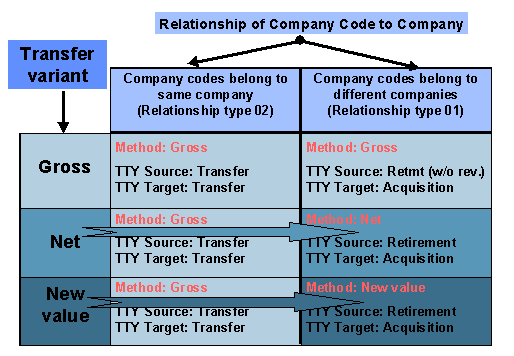
Standard Settings for Transfer Variants
The graphic assumes that with relationship type 01, the company codes belong to different companies, and are therefore affiliates belonging to a corporate group. For this reason, the Post to affiliated company indicator is set in the transaction type. As soon as one of the company codes does not belong to a company, then the company codes are not affiliated. In that case, you have to use transaction types in which the Do not post to affiliated company indicator is set.

Transfer variants 5 and 6 are used solely by the system itself for internal purposes, and are not available for asset transfers.
Transaction Types
In addition to the transfer method, you have to enter transaction types in the transfer variant. You need to enter transaction types for each company code relationship type or cross-system depreciation area. Depending on the transfer method you use, there are different transaction types that are permitted. The following rules apply to the Customizing definitions of the transaction types (standard cases):
Transaction type category/class: Retirement/acquisition or Retirement transfer/acquisition transfer
Transaction type category/proportional values: For retirement Proportional values are automatically determined; for acquisition Proportional values are entered
Transaction type/revenue indicator: Deselect Retirement with revenue
Transaction type category/class: Retirement/acquisition
Transaction type category/proportional values: For retirement Proportional values are automatically determined; for acquisition Proportional values are entered or No proportional values
Transaction type/revenue indicator: Deselect Retirement with revenue
Transaction type category/class: Retirement/acquisition
Transaction type category/proportional values: For retirement Proportional values are automatically determined; for acquisition Proportional values are entered or No proportional values
Transaction type/revenue indicator: Deselect Retirement with revenue
The transaction type category for all of the transaction types you use has to be Acquisition and production costs.
The transaction types valid for postings and their offsetting postings always have to use the same document type. However, in the intercompany transfer transaction, you can enter a different document type, just as you can in the intracompany transfer transaction.