Hardware and Software for the Internet Link
Hardware and Software for the Internet Link
The SAP Internet Mail Gateway belongs to the standard system of the R/3 System. In addition, you require a
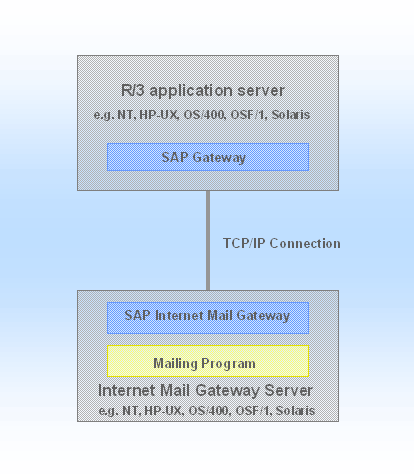
mailing program for the Internet link. The gateway is installed together with the mailing program either on an R/3 application server or - as in the graphic - on a separate NT-, Unix- or AS/400 computer. In the last case, both computers must be linked via a TCP/IP connection.Specify the computer on which you wish to install the Internet Mail Gateway server:
The computer on which you install the Internet Mail Gateway Server must not have the same system platform as the R/3 application server.
Include in your specifications the
activation type with which the SAP Internet Mail Gateway program should run, so that the outgoing Internet messages are transferred from the R/3-System to the mailing program.If you install the Internet Mail Gateway server on a Windows NT computer, additional software is required, depending on the activation type:
Activation type |
Additional software |
Start on an R/3 application server (recommended) |
No additional software is required. |
Start on a separate computer |
R/3 stand alone gateway or remote shell server The R/3 stand alone gateway is part of the standard system of the R/3 System. The remote shell server is part of the Microsoft Windows NT Resource Kit. |
Registering |
NT help program Srvany The program is part of the Microsoft Windows NT Resource Kit. |
To be able to use the activation type Registering on AS/400, you also require additional software. See Note 42710 in SAPNet.